Asynchronous Effects and Time
The previous chapter ended with side effects, changes that reach beyond a function and often beyond the program entirely. This chapter introduces asynchrony. It further complicates how we design our code, but it is what lets a program read from and change the world outside it.
Programs become much more useful when they interact with other programs and other users. A weather station that can only summarise readings typed into its source code is a calculator, but a weather station that can load a year of readings from a file, fetch the current conditions from a web service, and make a report accessible over the web is a system. Most software systems need to interact with the world to accomplish their tasks:
As a weather-station operator, I want to load past readings from a file and fetch current conditions from the regional service, so that my station can publish complete reports without my entering the data by hand.
But the outside world operates at a different pace than a program on a single computer. External interaction does not happen immediately. This chapter is about designing programs that cope with that slowness. The mechanics are a little tricky, but they let you read and write files and call web services. Those two capabilities are the foundation for a broad collection of common computing tasks.
How Long Computers Wait
Computer processors are fast: a simple operation takes around a nanosecond. Everything outside the processor is slower, and the further away the data lives from the processor, the slower it gets. The table below gives a sense of how long an action would take if a single instruction on a local processor took one second.
| Operation | Typical time | Scaled: if one instruction took 1 second |
|---|---|---|
| One instruction | 1 ns | 1 second |
| Reading from an SSD | 150 µs | ~2 days |
| Network round trip, same city | 1 ms | ~11 days |
| Reading from a spinning disk | 10 ms | ~4 months |
| Cross-country network round trip | 150 ms | ~5 years |
Touching a disk or a network is millions of times slower than computing. From the processor's point of view, asking a distant web service for the temperature and then waiting for the answer wastes time that could be spent on local work.
A call that waits like this is called blocking. A blocked function does not return until the slow work finishes, and the program makes no progress of any kind while waiting. For a program with nothing else to do, blocking costs little. For most real programs it is a real problem, because a program frozen for the duration of a network request cannot respond to its user, accept another request, or get any other work done.
One Thread at a Time
What a program can do while it waits depends on the language's threading model. A thread is an independent sequence of executing statements.
Many languages (such as Java and Rust) let a program run several threads at once. This means that one thread can block on the network while the others keep working. Multiple threads are useful, but error-prone. The previous chapter showed how hard it is to reason about one sequence of mutations. With multiple threads mutating shared objects, it is even harder.
TypeScript makes a different design decision. A TypeScript program runs on a single thread. Exactly one statement is executing at any moment. This means you never have to wonder whether some other thread changed an object between two of your statements. The model is simple to reason about and easy to use.
But a single thread exposes us to the dilemma of waiting. If the only thread blocks while waiting for a file to be read from disk, the entire program appears to have hung. To get around this, TypeScript provides a mechanism for a program to start a slow operation, carry on with other work immediately, and come back to the result when it is ready. Computation that is set aside to run later like this is called deferred computation.
Threads Elsewhere, and Why TypeScript Has One
In Java, creating a thread is a few lines of code. Large Java systems can run hundreds of them. Programmers must coordinate every access to shared state. Getting this wrong produces bugs such as deadlocks and race conditions, which appear and vanish depending on timing and are among the hardest bugs to find and fix.
Rust goes further and uses its type system to prevent many of these errors statically. This is part of why Rust is considered safer than other languages. The cost is that Rust is also harder to learn.
Python allows multiple threads, but in its standard implementation only one thread runs Python code at a time. In a simple Python program that uses neither threads nor asyncio, a network call or file read blocks: your code waits for the file to be read or the network call to finish.
JavaScript, the language TypeScript is built on, was designed for web browsers, where a page must stay responsive while images and data load. Its designers chose one thread plus deferred computation, a model that keeps a page responsive without the complexity of multiple threads. This has proven to be a durable choice and is the architecture of many of the systems that run the modern web.
Callbacks
You have been using deferred computation since the first chapter of the book. Every test does it:
test("longest freezing streak spans the early morning",
    checkExpect(() => longestFreezingStreak(day), 2)
);
The anonymous function () => longestFreezingStreak(day) is not executed where it is written. It is handed to checkExpect, which stores it and runs it later, when the test framework decides. A function passed as a parameter to be called later is a callback. Callbacks are how TypeScript expresses deferred computation.
The clearest way to see a callback in action is to slow it down. The built-in function setTimeout takes a callback and a duration in milliseconds, and executes the callback sometime after the duration has passed:
console.log("starting the kettle");

setTimeout(() => {
    console.log("kettle has boiled");
}, 10000);

console.log("getting a mug ready");
Run this and the output is:
starting the kettle
getting a mug ready
kettle has boiled        <- printed ten seconds later
This order breaks the model we have used in every previous chapter, where statements execute in the order they appear in the file. setTimeout does not block the program and wait ten seconds. It registers the callback and returns immediately, and the program continues to the next statement. Ten seconds later, when the timer expires, the callback runs.
Asynchronous programming requires a mental shift. While source code lists statements top to bottom, when each one runs is no longer the same as where it was written. This is another way the static and dynamic views of a program diverge.
Timers are predictable: you register their duration when you start them. But callbacks are commonly used to allow programs to respond to unpredictable events. Nowhere is this clearer than in a user interface (UI). Suppose the weather station's display has a refresh button. The program cannot know when the button will be clicked, or even whether it will be clicked at all. We could repeatedly check whether the button has been clicked, but checking constantly wastes computation, and checking only every few seconds makes the program slow to respond. Instead, to allow UIs to be responsive, the program registers a callback:
// refreshButton is an object representing the on-screen button
refreshButton.addEventListener("click", () => {
    redrawForecast();   // runs once per click, whenever the user clicks
});
When the user clicks the refresh button, the runtime raises an event and places it on a queue. As soon as the thread is free, the queued callback runs. User interfaces work this way: clicks, keystrokes, touches, and window resizes are all events with callbacks registered to handle them, and between events the thread is free to do other work. This style is called event-driven programming, and callbacks are what make it possible. Callbacks let a program describe what to do when something happens without ever asking whether it has happened yet.
Debugging with console.log or a Debugger?
console.log prints its argument to the terminal. Printing is itself a side effect, because it changes something outside the program. It is also a common way to watch the order in which a program works, which is why we use it in this chapter, now that when something happens matters.
Printing becomes less useful as programs grow and become distributed. Your IDE's debugger is usually a better choice, because it lets you pause the program at any point and inspect its whole state.
Behind the Scenes: The Event Loop
The runtime keeps a queue of callbacks that are ready to run, for example because a timer expired, a button was clicked, or data arrived from a disk or a network. The single thread runs a continuous cycle called the event loop. It takes the callback at the front of the queue, runs it to completion, and then takes the next one. If the queue is empty, the thread sleeps until something is added.
Every kind of event waits in that one queue:
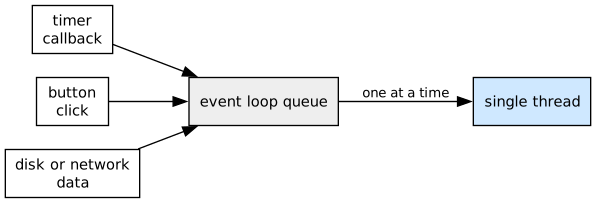
This design has two consequences. First, a callback is never interrupted partway through, so no other code runs until it returns. This is what makes single-threaded programs simple to reason about. It also means a callback that computes for a long time freezes the rest of the program, because the loop cannot move on until the callback returns. Second, a timer duration such as 10000 means the callback is queued no earlier than ten seconds from now. If the thread is busy when the timer expires, the callback waits in the queue for its turn, so the event loop guarantees the order callbacks run in, but not their exact timing.
Promises: A Future Value
Callbacks defer computation, but they do not provide a way to return results. Reading a file produces the file's contents, and fetching from a web service produces a response. The program needs that value, but it will not exist until the slow operation finishes, and the program should not stop while it waits. TypeScript represents a result that will arrive later as an object called a promise.
A promise works like a ticket at a busy coffee shop. Instead of standing at the espresso machine until your drink is poured, you are handed a numbered ticket and can sit at a table and check your phone. When your drink is ready, your number is called and you trade the ticket for the drink.
A promise is an object that a slow operation returns immediately, standing in for a value that will arrive later. Like any other value, it can be stored in a variable, passed to a function, or placed in an array.
A promise's type says what it will eventually deliver. A Promise<string> will deliver a string, and a Promise<Reading[]> will deliver an array of readings. This is the same generic notation that LinkedList<T> used earlier.
Promise objects have three possible states. Every promise begins as pending, while the work is still underway. When the work it was waiting for is done, the promise completes, or settles, in one of two ways. It can be fulfilled, holding the delivered value, or rejected, holding an error that explains why the value could not be produced. The language maintains two invariants on every promise. A promise settles at most once, and once settled, its state and value never change.
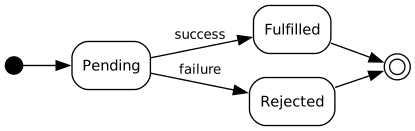
You will rarely create a promise yourself. Slow operations create them for you, and the file-reading and web-fetching functions later in this chapter all return them.
You will see promises often in return types. When a function's signature says it returns a Promise<string>, the call returns immediately, but what it returns does not yet contain the value you want. That value will be available only when the promise settles. Here is what happens when the promise itself is treated as the value:
import { readFile } from "fs/promises";

const contents = readFile("report.txt", "utf8");  // returns immediately
console.log(contents);  // prints "Promise { <pending> }", not the file's text
readFile returns a Promise<string>, so contents holds a pending promise. When the console.log runs, the disk has not yet finished reading the file. The type checker knows this too. contents has the type Promise<string>, not string, so contents.length is a compile error. The type system will not let you use the promise as if it were the value it stands for. The next section shows how to get the value.
Collecting Promise Values with .then
Every promise has a method named then, which accepts a callback. The promise calls that callback with the value once it is fulfilled:
readFile("report.txt", "utf8").then((contents) => {
    console.log(contents);  // the file's text, printed once it has arrived
});
This is how callbacks and promises connect. A promise is an object that runs callbacks for you when its value arrives, and the await syntax in the next section is built on this mechanism.
We show then here so you will recognise it in documentation and in other people's code, but we will not use it in this course. await is syntactic sugar for then: syntax that adds no new meaning, but makes the same thing easier to write and read. (In ISL, (define (f x) ...) is syntactic sugar for (define f (lambda (x) ...)) in the same way.)
async and await
Here is a function that reads a file using readFile, the promise-returning function from the previous section:
import { readFile } from "fs/promises";

async function loadReport(): Promise<string> {
    const report: string = await readFile("report.txt", "utf8");
    return report;
}
await takes a promise and produces the value it delivers. Above, readFile(...) is a Promise<string>, so await readFile(...) is a string. When execution reaches the await, the function pauses until the promise settles, and then continues with the value as if the file's contents had been returned directly.
The most important property of await is that it pauses the function, not the program. While loadReport is suspended at the await, the thread is free, and everything else the program has to do (timers, other deferred work, and other paused functions whose promises have settled) continues.
await
The expression
await <expression>where <expression> evaluates to a value of Promise<T> type, suspends execution until the promise settles. If the promise is fulfilled, await <expression> evaluates to the value it delivers, and execution resumes from there. If the promise is rejected, the await throws an error instead. The next chapter covers errors.
async marks a function that may contain await, and it changes the function's return type. An async function always returns a promise of its result. loadReport is declared to return Promise<string>, not string, even though its body returns a string, because loadReport cannot give its caller a string immediately. It is itself waiting on readFile, so the caller of loadReport must in turn await loadReport.
The caller gets a ticket of its own and collects it the same way, with await. This means asynchrony spreads upward. A function that awaits must be async, so its callers await it and must themselves be async, all the way up the program.
async
The keyword async declares that a function may wait on a promise.
async function f(x: X, y: Y, z: Z): Promise<T> {
    // function body must return a T
    // or a Promise<T>
}
If an await expression appears in a function body, that function must be declared async.
async and await do not make anything run faster, and they do not create threads. There is still exactly one statement executing at any moment. They are a more readable syntax for deferred computation: the same deferral the setTimeout example performed with a callback, written so that the code reads top to bottom again.
Promises and async/await work because the slow part of the work never needed our thread. When readFile starts, the request is handed to the language runtime and the operating system, which carry out the operation in the background. Blocking was never necessary, because the thread could not help with that work anyway. With await, the thread spends the waiting time running whatever else is ready (or, in a user interface, staying responsive), and the paused function continues when its value arrives.
Systems Details: Your Program, the Runtime, and the Operating System
A TypeScript program is the top layer of a stack, and each layer below it does part of the waiting. Beneath your program sits the runtime. One of the most common runtimes is Node, which executes your compiled code, runs the event loop described earlier in this chapter, and provides functions the language itself does not have, including setTimeout, readFile, and fetch.
Beneath the runtime sits the operating system, which manages the machine's hardware on behalf of all running programs at once. Your program never touches a disk or a network card directly. Its requests are passed down this stack.
Consider a single readFile. Your function calls readFile, the runtime asks the operating system for the file, and the operating system instructs the disk hardware to fetch the bytes, then turns to other work. No layer waits on the disk. The request exists only as an entry in a table recording who should be told when the bytes arrive. When the disk finishes, it signals the operating system (using a mechanism called an interrupt), the operating system passes the data up to the runtime, and the runtime fulfills the promise and places your paused function on the event loop's queue. The next time the loop reaches it, your function resumes at the await with the value.
The same sequence as a diagram:
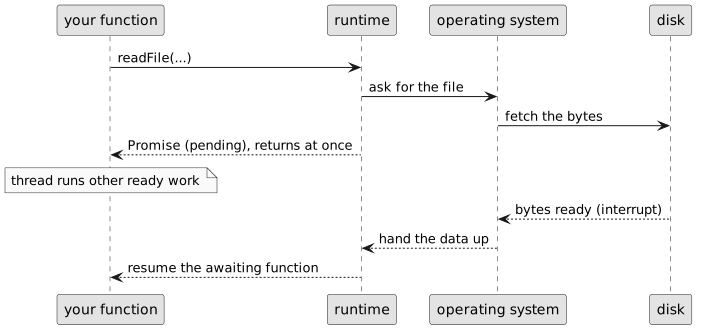
A paused function resumes through the same queue that clicks and timer callbacks use. Everything shares that one queue, served by the one thread, which is why a long-running computation delays everything: file results, button clicks, and resumed functions all wait behind it.
This layered design is why a single thread is enough. The waiting is done by the hardware and the operating system, which can handle thousands of requests at once, and your program's thread is used only for running your code. This is how a Node-based web server can handle thousands of simultaneous connections on a single thread.
The most common mistake in asynchronous code is calling a promise-returning function and forgetting the await. Sometimes the type checker catches it, for example when the promise is assigned to a variable declared as string. Sometimes the mistake only shows up when the program runs, as in the console.log example in the previous section, which printed a pending promise instead of the file's text. When the result is not used at all, the types raise no objection. A bare loadReport(); on its own line compiles, starts the work, and continues without waiting, which is almost never what the surrounding code intends.
Testing async Functions
The function you hand to checkExpect can be marked async too, and then it can await the functions it is testing:
test("the report loads",
    checkExpect(async () => {
        const report: string = await loadReport();
        return report.length > 0;
    }, true)
);
The thunk has a body in braces, like the tests of mutating functions in Chapter 6, because the check takes two steps: awaiting the report and then measuring it. As there, the value the check compares must be returned explicitly, and the compiler rejects the check if the return is missing.
checkExpect awaits whatever its function produces, so the test does not finish until every await inside it has completed. This also means checkExpect(() => loadReport(), expected) works without an await, because the check awaits the promise the thunk returns. Inside a block body, though, each async call still needs its own await. Without it, the next line works with a promise rather than the value it delivers.
checkError, from Chapter 3, runs the function it is given and passes only if that call fails with an error instead of producing a value. Chapter 8 covers errors in depth. checkError awaits in the same way checkExpect does, which matters for the slow operations in this chapter, since a file may not exist and a service may not answer. An async function does not fail at the point you call it. It returns a promise that later rejects, and the thunk hands that promise back to the check by awaiting it:
test("reading a missing file rejects the promise",
    checkError(async () => {
        return await readFile("no-such-file.txt", "utf8");
    })
);
Here checkError checks that the promise rejected rather than fulfilled. Because checkError detects when a function returns a promise, the compact form also works:
test("reading a missing file rejects the promise",
    checkError(async () => await readFile("no-such-file.txt", "utf8"))
);
Check your Understanding of async
Consider the following piece of code. It uses the promise-returning version of setTimeout from Node's timers/promises module, which waits the given number of milliseconds and then fulfills with the given value:
import { setTimeout } from "timers/promises";

async function slowlyReturnsThree(): Promise<number> {
    const three: number = await setTimeout(10000, 3);
    return three;
}
The function is annotated to return Promise<number>. However, the return three statement returns three, a variable whose type is number, not Promise<number>.
Should the return type of slowlyReturnsThree be number or Promise<number>? Explain why in your own words.
Reading and Writing Files
With async and await, we can now read and write files. Node, the runtime that executes our TypeScript programs, provides a standard library whose file-system module exports the two functions we will use: readFile, which delivers a file's contents, and writeFile, which replaces them. Both involve the disk latencies from the table at the start of this chapter, so both return promises.
import { readFile, writeFile } from "fs/promises";

/**
 * Copies today's report into the station archive.
 * Modifies the file system: creates or replaces archive.txt.
 */
async function archiveReport(): Promise<void> {
    const report: string = await readFile("report.txt", "utf8");
    await writeFile("archive.txt", report);
}
The documentation says what the function modifies, as the mutation chapter required. Writing a file is a side effect that outlives the function, and even the entire program. The order of the awaits also matters. writeFile cannot start until the contents have arrived, and the sequence of awaits expresses that dependency. The function pauses at the first await, resumes when the contents arrive, pauses at the second, and resumes when the write completes. The rest of the program keeps running throughout.
Text encoding (the "utf8" argument)
Files on disk are stored as raw bytes. The second argument to readFile names the text encoding to use when turning those bytes into a string, and "utf8" is the standard encoding for text and the one to use in this course. Without the argument, readFile delivers raw bytes rather than a string.
Reading and Writing JSON
Programs frequently send and receive data. They save it to files, send it across the network to other machines, and exchange it with programs written in other languages. To do any of that, the data has to be captured in a format that is agreed on ahead of time. A commonly used format is JSON, short for JavaScript Object Notation. You have already seen JSON in this course: the metadata files in the learning activities, such as package.json and tsconfig.json, are JSON files.
JSON's syntax is almost exactly the object and array literals you have been writing. Every JSON value is one of a small, fixed set of kinds. Four of them are the primitive values you already know, written just as they are in TypeScript:
string, always in double quotes:"CPSC 210"number, with no distinction drawn between integers and decimals:4,-273.15boolean:trueorfalsenull, for the deliberate absence of a value:null
The other two kinds are containers that hold other values, which is what lets JSON describe structured data.
A JSON object groups related values together inside { }:
{
  "hour": 6,
  "tempCelsius": -4,
  "freezing": true
}
Each entry has two parts separated by a :. The name on the left, "hour", is the key. The value on the right, 6, is what is recorded for that key. A key is always a string. Each key is unique within an object.
A JSON array is an ordered list of values inside [ ]:
[ -4, -1, 3, 8, 2, -2 ]The values in an array can be any JSON value, including objects:
[
  { "hour": 6, "tempCelsius": -4 },
  { "hour": 9, "tempCelsius": -1 },
  { "hour": 12, "tempCelsius": 3 }
]
JSON is flexible because values nest. The value filed under a key, or sitting in an array, may itself be an object or an array, and those may hold further objects and arrays. That is all of JSON: four primitive values, objects, and arrays, nested as required to describe data.
A Complete JSON Document
A full weather-station report brings every kind together at once:
{
  "stationId": "YVR-2",
  "active": true,
  "location": {
    "name": "Vancouver International Airport",
    "latitude": 49.19,
    "longitude": -123.18
  },
  "elevationMetres": 4,
  "readings": [
    { "hour": 6, "tempCelsius": -4, "note": null },
    { "hour": 9, "tempCelsius": -1, "note": "frost reported" }
  ],
  "tags": [ "coastal", "automated" ]
}
The whole document is one object. The value under "location" is a second object, nested inside the first. The value under "readings" is an array of objects, and inside one of those, "note" is null for the reading with no note and a string for the one that has it. The value under "tags" is an array of strings. Every value, at every depth, is one of the kinds above.
JSON only contains text. It cannot contain functions or variables. This simplicity is why JSON is so widely used. Because JSON is not tied to a specific language, a Python program can produce it, a file can store it, and your TypeScript program can consume it. The two sides only need to agree on the shape of the data. Engineers can also read JSON files without special tools.
Because JSON is text, a program cannot work with it as values directly. Two built-in functions convert between the notation and TypeScript values.
JSON.stringify goes from a value to text. Give it any array, object, or primitive and it returns a string in JSON notation:
const twoReadings: Reading[] = [
    { hour: 6, tempCelsius: -4 },
    { hour: 12, tempCelsius: 3 }
];

const text: string = JSON.stringify(twoReadings);
// '[{"hour":6,"tempCelsius":-4},{"hour":12,"tempCelsius":3}]'
The output is compact and hard to read. When a person has to read it, as with a configuration file, a third argument adds indentation:
JSON.stringify(twoReadings, null, 4); // the same data, indented by four spacesJSON.parse transforms data the other way, from text back to a value:
const restored = JSON.parse(text);restored now holds an array of objects, which the array operations from Chapter 5 can act on.
Two cautions follow from JSON being nothing but text. The first is that the conversion is lossy in one direction. JSON has no notation for a date, undefined, or a function. JSON.stringify turns a date into a string, and leaves out object properties whose value is undefined or a function, without complaint. A value that goes through stringify and back through parse equals the original only when everything in it was a kind JSON can express. The second is that JSON.parse cannot know what the text contains. The text is not available until the program runs, so the compiler cannot inspect it or give the result a meaningful type. An annotation does not fix this:
const readings: Reading[] = JSON.parse(text); // hoped for, not checkedThe compiler accepts that line and then checks every later use of readings against a type nobody verified. If the text came from a file somebody edited by hand, from another team's program, or from an older version of the format, the values may be nothing like Reading, and the compiler has no way to know. For now, work with JSON your own code produced, where the shapes are known. Data from somewhere you do not control must be checked before it is trusted, as Part 3 describes.
Together with readFile and writeFile, JSON.stringify and JSON.parse let a program save its data to a file and load it back later.
Calling Web Services
The second capability this chapter introduces is calling web services. A web service is a program running on another machine that answers requests over the internet. You send it a request in the form of a URL, and it responds with data. The built-in function fetch makes the request and, because the network is slow, returns a promise.
Suppose the regional weather network runs a service that reports current conditions for any station. Asking it for our station's temperature looks like this:
type StationReport = {
    stationId: string;
    tempCelsius: number;
};

async function currentTemperature(stationId: string): Promise<number> {
    const response: Response = await fetch("https://weather.example.org/stations/" + stationId);
    const report: StationReport = await response.json();
    return report.tempCelsius;
}
There are two awaits because the answer arrives in stages. The first delivers the response once the service has begun answering. The second, response.json(), delivers the response's body, parsed from JSON text into an object as JSON.parse would, which can itself take time for a large reply. After the second await, report is an ordinary object.
As with JSON.parse, the type annotation on report states our expectation, but the compiler cannot verify it. The data was produced by another machine at runtime, and the type checker cannot see across a network. If the service changes its reply format, the program will still compile, but will misbehave when it runs.
The compiler's guarantees stop at the program's edge. Data arriving from outside should be checked before the rest of the program relies on it, as the invariants chapters described. We will not write that checking here, but this boundary is where it belongs.
Waiting in Parallel
Everything so far has waited for one slow operation at a time. Real programs often need several. A weather station keeps a log per instrument, and a report needs all of them. A web page may need several answers from a service before it can display anything. The obvious way to read several files is a loop:
/**
 * Reads every file named in paths.
 */
async function readAllInTurn(paths: string[]): Promise<string[]> {
    const contents: string[] = [];
    for (const path of paths) {
        const text: string = await readFile(path, "utf8");
        contents.push(text);
    }
    return contents;
}
This produces the right answer, but inefficiently. The await is inside the loop, so the second read cannot begin until the first has finished, and the third waits on the second. At the SSD figure from the table at the start of this chapter, three reads take 450 µs instead of 150 µs, and nineteen files take nineteen times as long. The files are independent of one another, so there is no need to read them one at a time.
Recall that the disk does the waiting, not our thread, and the operating system can handle several requests at once. The loop above does not take advantage of this, because it waits for each answer before sending the next request.
The problem is easier to see once you separate two things that await combines:
- Calling a promise-returning function starts the work.
- Awaiting the promise collects the result.
await readFile(...) does both on one line. This is right when the next step depends on the previous one, which is why archiveReport was written that way: the write could not start before the read finished. When the operations are independent, it is wasteful, because each operation starts only after the previous result has been collected.
Instead, we can start all the reads first, and then collect the results:
/**
 * Reads every file named in paths, all at once.
 */
async function readAll(paths: string[]): Promise<string[]> {
    const pending: Promise<string>[] = paths.map((path: string) => readFile(path, "utf8"));
    return await Promise.all(pending);
}
There is no await inside the map. Each call to readFile starts a read and returns its promise immediately, so by the time map finishes, every read has started and the disk is working on them together. Promise.all then takes that array of promises and returns a single promise that is fulfilled once all of them have been fulfilled.
readAllInTurn   |--A--|--B--|--C--|     450 µs
readAll         |--A--|                 150 µs
                |--B--|
                |--C--|
The total wait is now the time of the slowest operation rather than the sum of all of them, and the difference grows with every file added.
Promise.all has two useful properties. First, it turns an array of promises into a promise of an array, Promise<T>[] into Promise<T[]>, and the results come back in the order you supplied them, not the order they finished. If the second file is small and arrives first, it is still second in the returned array.
Second, when there is a fixed set of operations, the result can be destructured, and the type checker tracks each position separately:
const [current, history, calibration]: [string, string, string] = await Promise.all([
    readFile("current.json", "utf8"),
    readFile("history.csv", "utf8"),
    readFile("calibration.json", "utf8"),
]);
This approach works well whenever a function needs several specific files or service calls before it can continue.
When one of them fails. Promise.all rejects as soon as any of its promises rejects, reporting that rejection's reason without waiting for the rest. The other operations are not cancelled. They continue, and their results are discarded. This is usually the behaviour you want: if one required file is missing, the whole operation cannot proceed, and failing immediately with the reason is more useful than continuing. The next chapter covers how to handle such failures. If you need every outcome rather than the first failure, Promise.allSettled waits for all of them and reports each one separately, but Promise.all is the usual default.
When a loop is correct. Running operations concurrently is only correct when they are independent. When each step depends on the one before, a sequential loop is correct and Promise.all would be wrong, because you cannot start a request that needs the previous request's answer. Writing to the same file several times in order, or reading a service's pages where each reply names the next page, are both sequential.
The noAwaitInLoops lint rule
The lint configuration used in this course reports await in a loop body as an error. The rule exists because this pattern is usually accidental. It is what you get by writing the synchronous version and then adding await where the compiler asks for it, and the resulting code is correct but slow in a way tests rarely detect. When you see the error, ask whether iteration n needs anything from iteration n − 1. If it does not, use map and Promise.all instead.
Check your Understanding of Promise.all
Consider these two functions, both reading the same three files:
async function versionOne(): Promise<number> {
    const a: string = await readFile("a.txt", "utf8");
    const b: string = await readFile("b.txt", "utf8");
    const c: string = await readFile("c.txt", "utf8");
    return a.length + b.length + c.length;
}

async function versionTwo(): Promise<number> {
    const reads: Promise<string>[] = [
        readFile("a.txt", "utf8"),
        readFile("b.txt", "utf8"),
        readFile("c.txt", "utf8"),
    ];
    const [a, b, c]: string[] = await Promise.all(reads);
    return a.length + b.length + c.length;
}- Both return the same number. Which finishes sooner, and roughly by how much, if each read takes 150 µs?
- Neither function has a loop, so the lint rule is silent about both. Is
versionOnenevertheless the same mistake asreadAllInTurn? Explain what makes the two equivalent. - In
versionTwo, the three reads all start before theawaiton the line below them. What line does the first read actually start on? - Suppose
b.txtdoes not exist. In each version, doesa.txtget read? Doesc.txt?
From Mechanics to Abstraction
Mutation introduced state and time inside the program. Asynchrony extends this to the world outside the program, where data lives on disks and other machines and arrives only after a wait. TypeScript's model is single-threaded and deferred. Slow operations return promises, await collects their values while the thread does other work, and async marks every function that waits. With files, JSON, and web services available, our programs can work with data from outside their own source code.
These operations can also fail in ways pure computation cannot: a file may not exist, a network may be down, or a service may return malformed data. When an awaited promise rejects, the error appears in your program at the await, and handling these failures well is the subject of the next chapter. For this chapter's exercises, assume files exist and services answer. If your program crashes, read the error message and fix what it points to, most often a path or URL that is not quite right.
Exercise: A Journal on Disk
Practise using async and await for reading and writing files on a new kind of data.
As a journaling app, I want to count a writer's entries, keep a backup of their journal, and restore it on request, so that they can track their progress and recover their work if the file is lost.
The journal is a plain text file, one entry per line.
- Write
async function lineCount(path: string): Promise<number>that reads the file atpathas text (pass"utf8"toreadFile) and returns how many lines it has. (Hint:text.split("\n")gives an array of the lines.) Test it with an async check, of the formtest("...", checkExpect(async () => await lineCount("entries.txt"), ...)). - Write
async function backUp(path: string): Promise<void>that reads the journal and writes its contents to a new file atpath + ".bak". Write the doc comment: record that the function modifies the file system, as the mutation chapter required. Note that the twoawaits must run in order: the backup cannot be written before the contents have been read. - Write
async function restore(path: string): Promise<void>that reads the backup atpath + ".bak"and writes its contents back topath, replacing the journal with the backed-up copy. Write the doc comment: document the file-system change, and, as inbackUp, make sure the read finishes before the write begins.