Using Types to Model Problems
In the last chapter we used types to annotate individual values: a parameter was a number, a function returned a string, and the compiler checked that we used them consistently. These primitive types are enough when a program passes around single, unrelated values, but real information rarely arrives one value at a time.
Consider a song. A song is not one value. It has its musical content and a lot of metadata associated with it.
Exercise: What's in a song?
Take a minute to think about what a song is. What core data and metadata might you associate with a song? Does this change based on the application that consumes the song? (For example, does it matter whether one person uses the application, or many users can interact with the same song?)
The data we choose to associate with a song below is one example of how we might represent a song, but it's not the only correct representation of a song.
For instance, a song has at least a title, an artist, and a duration. These facts only mean something together, when they describe the same song. With only primitive types we would carry these as three separate values and have to remember, everywhere, that they belong to the same song. Nothing would stop us from pairing one song's title with another's duration, or forgetting the duration entirely, or passing an artist where a title was expected (both are strings, so the compiler would stay silent). The information has a shape, and primitive annotations cannot capture it.
Other information cannot be expressed with primitives at all. A playlist is either empty or a song followed by another playlist. This spells out two distinct cases, and the playlist can be any length. No single number or string means "either nothing, or a song and then more songs."
This chapter introduces the tools to describe information like this: compound types that group related values into one, unions that model alternatives as distinct cases, and self-reference for recursive structure. Writing such a description down as a data definition gives the program a shape to follow. It also lets the compiler hold us to that shape, catching whole classes of mistakes before the program runs.
This is the data-definition design you practised in CPSC 110, now written directly in the language and checked by the compiler.
Assigning Values to Names
Before we build values of any type, we need a way to name them. In TypeScript we assign a value to a name with const: the name comes first, then its type, then =, then the value.
const courseName: string = "CPSC 210";
const credits: number = 4;
A name introduced with const cannot be reassigned to a different value later: courseName will always refer to that one string. Every value in this chapter is named with const. Names whose values are meant to change come later, when we look at mutation.
Declaring Variables with const
The syntax
const x: T = edeclares a variable x of type T and initialises it to the value that expression e evaluates to. Variables declared with const cannot be reassigned to different values later. You also cannot use const to declare the same variable twice.
As with other one-line statements, we will put a semicolon ; after it when writing it in programs.
const vs define
In ISL, you wrote
(define course-name "CPSC 210")to bind a name to a value. In TypeScript, the same binding is
const courseName: string = "CPSC 210";The TypeScript version adds a type annotation that the compiler checks. This is slightly more work, but it lets the compiler catch basic bugs for us. For instance:
// static error: Type 'string' is not assignable to type 'number'
const courseNum: number = "210";
Modelling Data
A data definition is a precise description of which values a type can express. As you design more software systems, you may develop your own process for deriving them.
To get you started in this course, we propose a systematic process to turn a natural-language description of a problem into a type. The main steps are:
- Identify the main entities.
- Identify any distinct cases.
- Determine what information each case needs.
- Translate into a TypeScript type.
- Write concrete examples to check your model.
- Look for generalisation.
The rest of this chapter works through this process on the examples below, from the simplest to the most involved. As we go we will meet the building blocks TypeScript provides for specifying types: primitive values for atomic facts, unions of literals for fixed choices, types that group related values together, and self-reference for recursive structure.
Types and Data Definitions
This is the data-definition step of the design recipe from CPSC 110. There you described a class of values in a comment before writing any function. In CPSC 210, you'll write a similar description as a type the compiler can enforce, rather than a comment it ignores.
We won't grade you on following the process described above. Its purpose is to give you a way into a design problem when you are stuck.
Traffic Lights
Consider the natural language description of traffic light data:
As a driver, I want the intersection's signal to be exactly one of red, yellow, or green, so that I always know whether to stop, slow down, or go.
Let's apply our systematic process. One design is as follows:
- Entities: the signal at an intersection.
- Cases: it shows one of three colours: red, yellow, or green.
- Information per case: none. A colour is a bare label that carries nothing beyond itself.
- Translate: a value that is one of a fixed set of labels is exactly a union of string literals.
- Concrete examples: one valid colour, plus an invalid one to confirm the type is enforced.
- Generalisation: none. A small enumeration stands on its own.
In step 4, we translate the data definition into the following TypeScript type:
type TrafficLight = "red" | "green" | "yellow";For step 5, our concrete examples could be:
const light: TrafficLight = "red";   // ok
const broken: TrafficLight = "blue"; // error: "blue" is not a TrafficLight
Union of Literals
A union of literal values expresses that variables of that type can take on exactly the specified literal values. The following, where | is read as "or":
type TypeName = v_1 | v_2 | v_3;expresses that values of type TypeName can take on exactly the values v_1, or v_2, or v_3. There can be as many literal values v_i as you want.
Above we used strings, but numbers work as literals too, so the same idea models any fixed set of values:
type HttpStatus = 200 | 301 | 404 | 500;Songs
Let's move on to applying our systematic process to the song example we started with:
As a listener, I want each song to carry its title, artist, and length, so that I can see what is playing and how long it will last.
- Entities: the only entity here is a song.
- Cases: A song has just one case: every song has the same shape, so there are no alternatives to distinguish.
- Information per Case: the description says a song carries three facts: a
title, anartist, and a duration in seconds. - Translate: A song's facts belong together, so we describe their shape with an object type, which lists named properties and their types. A type describes a shape, but it is not itself a value.
Songis the shape, and the songs themselves come in step 5.
type Song = {
  title: string;
  artist: string;
  durationSeconds: number; // must be positive
};
The type cannot express that a duration must be positive, so we record that constraint in a comment. Chapters 3 and 4 show how to check and enforce constraints like this one.
Grouping Values Together with Object Types
To express a type that groups multiple pieces of data together, we use object type syntax. In particular, the following:
type TypeName = {
  prop_1: Type1;
  prop_2: Type2;
  prop_3: Type3;
};
declares a type TypeName which has 3 pieces of data. Each piece of data has a name (prop_x) and a type (TypeX).
- Concrete Examples: An actual song is an object: a value that has that shape, an instance of the type. We create an object by writing an object literal. Below,
song1andsong2are two separate songs that share theSongtype.
const song1: Song = {
  title: "Song A",
  artist: "Artist 1",
  durationSeconds: 200
};

const song2: Song = {
  title: "Song B",
  artist: "Artist 2",
  durationSeconds: 180
};
Creating Object Values with Object Literals
The syntax
const v: TypeName = {
  prop_1: <expression-1>,
  prop_2: <expression-2>,
  prop_3: <expression-3>
};
defines a value v of type TypeName, setting each prop_x to the value of <expression-x>. There can be any number of property-expression pairs, but they must match the type.
The TypeScript type checker will check that: (1) each prop_x is defined in TypeName's definition, and (2) each <expression-x> is of the type that prop_x is declared to have in TypeName's definition.
Object types and object values differ in one piece of syntax. In object types, properties are separated with semicolons, and in object values, with commas.
- Generalisation: A song is a single fixed shape, so there is nothing to generalise.
Reading an Object's Properties
Creating an object stores its data, and reading that data back out uses dot notation. To do this, write the object's name, followed by ., followed by a property name. This evaluates to the value held under that property:
song1.title;           // evaluates to "Song A"
song1.durationSeconds; // evaluates to 200
The property name is part of the program text, not a string or a variable, and it is checked against the object's type: song1.length does not compile, because Song declares no length. This is the guarantee the type gave us when building the object, now applied to taking it apart.
When a property holds another object, a second . reads a property of that result, so accesses chain from left to right. We rely on this in the next example, where a playlist's first property holds a Song and the song's title is read with playlist.first.title.
Reading Properties with Dot Notation
A property is read by naming it after a dot:
<object>.<propertyName>The expression evaluates to the value stored under <propertyName>. If that value is itself an object, a further property is read from it in the same way, evaluated left to right:
<object>.<propertyName>.<propertyName>The name after each dot is fixed in the source and checked against the type of the value on its left, so naming a property the type does not declare is a compile-time error rather than a value that is absent at run time.
Object Types and define-struct
The object type we used to define Song plays the role of a structure definition. In CPSC 110 you would have defined such a struct with (define-struct song (title artist duration)), made an instance with (make-song title artist duration), and read a field with a generated accessor, (song-title s).
TypeScript uses three notations for these tasks: the object type is the definition, the object literal makes an instance directly, and dot notation reads a field, so (song-title s) becomes s.title.
Playlists
This example builds on the Song type from above:
As a listener, I want to build an ordered list of songs of any length, so that I can queue up exactly the music I want to hear.
Entities: The nouns give us a playlist, built from the song we just modelled.
Cases: A playlist has two distinct cases: it is empty or non-empty.
Information per Case: The empty case needs no information beyond being empty. The non-empty case needs two things: its first song, and the rest of the playlist after that song. That last piece, the rest, is itself a playlist, so this definition is recursive.
Translate: A playlist has cases, so we model it as a tagged union: a union of one type per case, where each case carries a shared discriminator property (here
kind) set to a different constant. Checking the discriminator tells both us and the compiler which case we are in, and therefore which properties are available.
type Playlist = EmptyPlaylist | NonEmptyPlaylist;

type EmptyPlaylist = {
  kind: "empty";
};

type NonEmptyPlaylist = {
  kind: "songs";
  first: Song;
  rest: Playlist;
};
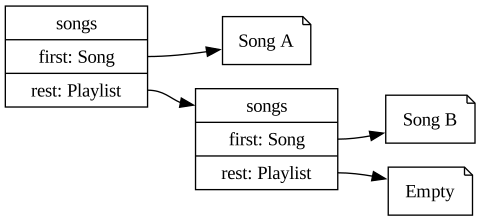
EmptyPlaylist carries no song data, and NonEmptyPlaylist carries the first Song and the rest of the playlist. The rest property has type Playlist again, and that self-reference is what lets one type describe a playlist of any length.
The self-reference makes a playlist a chain: each songs node holds one Song and points at the rest, until the chain ends in empty.
Tagged Unions
Previously we saw unions of literals. Tagged unions have similar syntax, but combine type names rather than literal values:
type UnionType = Type1 | Type2 | Type3;Each TypeX must have a definition that includes the property kind:
type Type1 = {
  kind: v_1;
  prop_1: T1;
  // ... as many properties as you like
};
The type of kind is a single literal v_1, different in each case, while the other properties can have any type. The kind is the "tag" in tagged union.
Across the whole UnionType, the type of kind is a union of literals. Within each case, kind is one specific literal, which is what lets a check on kind identify the case.
- Concrete Examples: With the type written, we build concrete examples from the songs we already have. If they are easy to construct, the design fits. If they are awkward, the model is probably too complicated. These examples also become the data our tests run against later.
const empty: Playlist = { kind: "empty" };

const oneTrack: Playlist = {
  kind: "songs",
  first: song1,
  rest: empty
};

const twoTracks: Playlist = {
  kind: "songs",
  first: song1,
  rest: { kind: "songs", first: song2, rest: empty }
};
Because an object is a value like any other, oneTrack and twoTracks reuse the empty object we already named rather than building a new one.
- Generalisation: A playlist is one instance of a more general shape: a list of any element type. If a program needed lists of several different things, we would write that shape once and let it take the element type as a type parameter, written in angle brackets. A type parameter lets one definition serve many content types:
type LinkedList<T> =
  | { kind: "empty" }
  | { kind: "node"; head: T; tail: LinkedList<T> };
A playlist would then be a LinkedList<Song> and a leaderboard a LinkedList<number>. We keep the concrete Playlist from above so its kind labels stay readable, but it describes exactly the same values.
Generic Types
In a type definition, type TypeName<T,S,R> = ..., the names in angle brackets (here T, S, and R) are type variables. While regular program variables take on concrete values, type variables take on types. They can be used in the definition of TypeName as stand-ins for particular types. A type definition can have any number of type variables (LinkedList above has one).
We call TypeName<T,S,R> a generic type when it has any type variable in its definition.
So far, angle brackets such as <expression> have marked a place in a code pattern where something can be filled in, such as any expression (3, 3 + 2, foo(3)). In a generic type, the angle brackets are real TypeScript syntax.
For the LinkedList example above, the compiler will ensure we are correctly populating the list based on its type:
// valid song list
const playlist: LinkedList<Song> = {
  kind: "node",
  head: song1,
  tail: { kind: "node", head: song2, tail: { kind: "empty" } }
};

// invalid song list; the second 'song' is only a song title
const badList: LinkedList<Song> = {
  kind: "node",
  head: song1,
  tail: { kind: "node", head: "song title", tail: { kind: "empty" } }
};
The compiler's error for badList points at the exact property that violates the type parameter:
Type 'string' is not assignable to type 'Song'.Use generics only when you see real duplication in your code. Until then they add abstraction without benefit.
Functions Follow Data
With the data defined, writing functions over it is far less open-ended than it first appears, because the structure of the code will mirror the structure of the data.
The data definition provides a template. If the data has distinct cases, the function branches on the case, and if the data is recursive, the function is recursive. A precise data definition has already done much of the design of the functions that consume it.
Function Templates
This section is analogous to the template step of the design recipe. In CPSC 110 the shape of a data definition dictated the shape of the function that consumed it: an itemisation became a cond with one clause per case, and a self-referential definition became a natural recursion. The same correspondence holds in TypeScript.
We won't strictly enforce a template step in CPSC 210. But, if you find yourself lost and unsure where to start, you can look at the structure of the type to guide your programming.
Branching on the Case
When data has multiple cases, a function analyses which case it has and responds to each. We do this with an if/else chain: one branch per case, testing the value itself for a union of literals, and the value of the discriminator for a tagged union.
An if/else chain over a union of literals has one branch per value:
function action(light: TrafficLight): string {
  if (light === "red") {
    return "stop";
  } else if (light === "yellow") {
    return "slow down";
  } else {
    return "go";
  }
}
The comparisons above use === to test a value against each literal. This is the first time we have compared values for equality.
Evaluating Equality with ===
TypeScript has several equality operators, with differing amounts of rigour. We will always use === (often called triple equals) in CPSC 210. Using this operator ensures that two values are strictly equal. Here are some examples.
test("a number equals itself", checkExpect(() => 1 === 1, true));

test("a boolean equals itself", checkExpect(() => true === true, true));

test("equal strings are equal",
    checkExpect(() => "cpsc210" === "cpsc210", true)
);

1 === "1";        // compile error: the types 'number' and 'string' have no overlap
true === "true";  // compile error: the types 'boolean' and 'string' have no overlap
A value of one type is never strictly equal to a value of another, and when TypeScript can see that the types differ, as in the last two lines, it rejects the comparison before the program runs. Comparing a number with a string is almost always a mistake, so TypeScript reports it.
Non-strict equality (==) converts its operands to a common type before comparing them, which can be confusing:
test("a number loosely equals itself", checkExpect(() => 1 == 1, true));

test("a boolean loosely equals itself",
    checkExpect(() => true == true, true)
);

1 == "1";   // compile error in TypeScript
true == 1;  // compile error in TypeScript
TypeScript rejects the last two lines because it can see that the types differ. When the types are not known in advance, for example for data read from a file or a network, == still converts the values when the program runs, and the result is often a surprise. Because of this, always use === in this course. The course's lint rules report every use of == as an error.
The same idea holds for a tagged union, but we branch on kind. After the check, the matching case's properties are available and read with dot notation, so p.first.title selects the first song, then its title:
function firstTitle(p: Playlist): string | null {
  if (p.kind === "empty") {
    return null;
  } else {
    return p.first.title; // p.first is known to exist here
  }
}
An empty playlist has no first title, so firstTitle returns null. TypeScript has two values that stand for the absence of a value. null represents a deliberate "no value here", such as the result of a lookup that finds nothing. undefined is the value a name has when nothing has been assigned to it yet. Each is its own type, and both are useful in combination with other types. The return type string | null says that firstTitle produces either a title or nothing.
const noMatch: null = null;
const notSet: undefined = undefined;
Checking the discriminator also unlocks the case's data. This is called type narrowing: once you have tested that p.kind === "songs", the compiler knows that p.first and p.rest exist and lets you use them, while preventing you from accessing properties the other case does not have. For instance, the following code would not pass the type checker:
function firstTitle(p: Playlist): string {
  if (p.kind === "empty") {
    // Error: Property 'first' does not exist on type 'EmptyPlaylist'
    return p.first.title;
  } else {
    return p.first.title;
  }
}
Recursing on the Structure
A recursive data definition leads to a recursive function. The function handles the base case directly (an empty playlist) and the recursive case by combining the first element with the result of calling itself on the rest. Because every value ends in the empty case, the recursion is guaranteed to terminate.
The same template solves a whole family of problems: counting elements, accumulating a total, and building a new structure all share the shape "handle empty, otherwise combine first with the recursion on rest."
Here are two functions that count and accumulate over a playlist:
function countSongs(p: Playlist): number {
  if (p.kind === "empty") {
    return 0;                       // base case
  } else {
    return 1 + countSongs(p.rest);  // recursive case
  }
}

function totalDuration(p: Playlist): number {
  if (p.kind === "empty") {
    return 0;
  } else {
    return p.first.durationSeconds + totalDuration(p.rest);
  }
}
The same template builds a new playlist from an old one, here keeping only the longer songs:
function keepLongSongs(p: Playlist, minSeconds: number): Playlist {
  if (p.kind === "empty") {
    return { kind: "empty" };
  } else if (p.first.durationSeconds >= minSeconds) {
    return { kind: "songs", first: p.first, rest: keepLongSongs(p.rest, minSeconds) };
  } else {
    return keepLongSongs(p.rest, minSeconds);
  }
}
The shape is not unique to lists. A tree branches into two recursive calls instead of one:
type BinaryTree = Leaf | Branch;
type Leaf = { kind: "leaf"; value: number };
type Branch = { kind: "branch"; left: BinaryTree; right: BinaryTree };

function sum(tree: BinaryTree): number {
  if (tree.kind === "leaf") {
    return tree.value;
  } else {
    return sum(tree.left) + sum(tree.right);
  }
}
What the Types Can Catch
Modelling the data this way changes what can go wrong. Because the types describe the exact shape of the information, the compiler rejects code that does not respect that shape, and it does so before the program ever runs.
Given the Song and Playlist types, each of these is rejected at compile time:
// a required field is missing
const bad1: Song = { title: "A", artist: "B" };
// error: property 'durationSeconds' is missing

// a field has the wrong type
const bad2: Song = { title: "A", artist: "B", durationSeconds: "200" };
// error: 'string' is not assignable to 'number'

// accessing data the case may not have
function firstSong(p: Playlist): Song {
  return p.first;
  // error: 'first' does not exist on an empty playlist
}
Without the types, none of these would be caught until the program ran, if they were caught at all.
The types rule out whole categories of mistakes statically, but they cannot check that a function computes the right answer. For that we still write tests. As in CPSC 110, we use checkExpect to state what a call should produce and have it checked when the program runs.
Using the example playlists from above:
test("an empty playlist has no songs",
    checkExpect(() => countSongs(empty), 0)
);

test("a two-track playlist has two songs",
    checkExpect(() => countSongs(twoTracks), 2)
);

test("a two-track playlist totals both durations",
    checkExpect(() => totalDuration(twoTracks), 380)
);
These run the functions and confirm they produce the expected values. The compiler checks that the shapes line up, and checkExpect checks that the answers are right.
The Centrality of Abstraction
A precise data definition is the foundation everything else rests on. It catches mistakes early, mirrors the structure of the problem, and drives the structure of the code that consumes it. In this chapter we followed one modelling process from a simple enumeration, through a song, to a recursive playlist, and the functions over each followed the shape of the data.
From here, Part 1 builds directly on this work: using generic types such as arrays and promises, deriving tests from the structure of data, and leaning further on the type checker. In Part 2, when we move to object-oriented programming, the tagged unions you wrote here become class hierarchies. The underlying ideas will carry over even as the syntax changes.
Exercise: Modelling a Journey
Let's apply the process from this chapter to a new problem, then write functions whose shape follows the data.
As a commuter, I want to describe a journey as a sequence of legs, each with a mode of travel and a duration, so that I can total the travel time and see how I am getting around.
A journey is either arrived (there are no more legs) or a leg: a single mode of travel, a duration in minutes, and the rest of the journey after it. The mode of travel is one of "walk", "bus", "train", or "bike".
- Model the data. Following the process, write a
Modetype as a restricted value (a union of the four literals), and aJourneytype as a tagged union with akinddiscriminator, one case for arrived and one for a leg.Journeyhas the same shape asPlaylist: an empty case, and a "first thing plus the rest" case. - Write two example journeys: one that is only arrived, and one with at least two legs.
- Following the shape of the data, write
totalMinutes(journey: Journey): number, using case analysis onkindand recursion on the rest. - Write
usesTransit(journey: Journey): boolean, which istruewhen any leg travels by"bus"or"train". - Write a
testholding a singlecheckExpectfor each function against your example journeys. Predict each result before you run them.
Bonus task: which step of the modelling process suggests turning Journey into a generic type, and what would it become?