Arrays and Iteration
It is common for programs to work with data represented as a sequence. The messages in an inbox, the transactions on an account, the students in a course, and the readings from a sensor are all naturally sequences of items. Because sequences are so common, most programming languages provide a built-in data structure for them, usually called an array: an ordered collection of elements that can be accessed by position. C, Java, Rust, Python, and TypeScript all provide arrays (Python calls them lists), and every language has similar features for working with them.
We have already hand-built a mechanism for tracking a sequence. In Using Types to Model Problems we defined a recursive Playlist and wrote a recursive function every time we wanted to count, total, or search it. That worked, but we had to rewrite the same traversal pattern in every function. Languages provide built-in support for the most common traversal patterns.
In TypeScript, arrays come with the traversal operations already written for transforming, selecting, and searching sequences. This chapter introduces arrays, those built-in operations, and then iteration, the general mechanism underneath them all.
A Day of Temperature Readings
This chapter uses a single running example:
As a weather-station operator, I want to summarise a day of hourly temperature readings, so that I can publish accurate daily reports without computing them by hand.
Each weather reading records the hour it was taken and the temperature at that time. The day's weather data is a sequence of these readings.
type Reading = {
  // invariant: a whole number, 0 <= hour <= 23
  hour: number;
  tempCelsius: number;
};
Creating and Using Arrays
An array is denoted by appending [] to the element type: Reading[] is an array of Reading objects. An array is created with an array literal: the elements, separated by commas, between square brackets.
// create an array containing 6 Reading elements
const day: Reading[] = [
    { hour: 6,  tempCelsius: -4 },
    { hour: 9,  tempCelsius: -1 },
    { hour: 12, tempCelsius: 3 },
    { hour: 15, tempCelsius: 8 },
    { hour: 18, tempCelsius: 2 },
    { hour: 21, tempCelsius: -2 }
];

// create an empty array
const empty: number[] = [];
Array Types and Literals
The type X[] designates an array of elements of type X. X[] can also be written Array<X>. The two notations mean the same type, the second using the generics syntax from Chapter 2. In this course we use the shorter and more common X[] form.
An array literal is an expression:
[<expression-1>, <expression-2>, <expression-3>]which creates an array with <expression-i> as the i-th element. It can contain any number of elements, including zero.
Lists in ISL
The array literal plays the role of list from CPSC 110: [ -4, -1, 3 ] is the counterpart of (list -4 -1 3). ISL lists were built from cons cells, which is exactly the recursive structure we rebuilt as LinkedList previously. Arrays package the same idea as a single built-in type, with direct access to any position by index.
The compiler enforces that every element of an array has the same type. Trying to put a string into a Reading[] is a type error, and anything you take out of a Reading[] is guaranteed to be a Reading. Array elements are accessed by their index, their position counting from zero. The number of elements in the array is available through its length property:
const first = day[0];        // { hour: 6, tempCelsius: -4 }
const second = day[1];       // { hour: 9, tempCelsius: -1 }
const count = day.length;    // 6
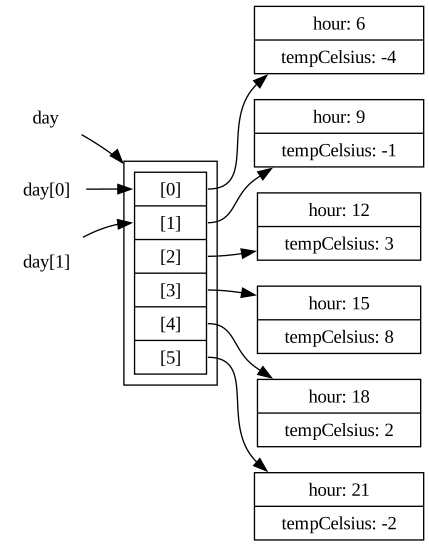
The day array is represented in memory as a row of six cells, one per index. The cells do not contain the Reading objects themselves. Each cell holds a reference to a separate Reading that lives elsewhere. day[0] names the cell at index 0, and that cell holds a reference to where the Reading object is stored. We will introduce references in detail in Chapter 6.
Array Operations
TypeScript provides operations that cover the most common things a program does with a sequence. Each operation takes a function as its input. The input function describes what should happen to one element, and the operation applies the function across the whole array. The input functions will usually be declared with arrow functions (lambdas), which we saw in Chapter 1.
The four most commonly used operations are map, filter, reduce, and find. map transforms every element, filter keeps a subset, find locates one element, and reduce summarises the array. A fifth, toSorted, puts the elements in order.
Calling Array Operations
Given an array a, we call an operation with a.operation(fun). fun is the function that says what to do with each element, usually an arrow function: (elem: ElemType) => <expression>.
map, filter, foldr
CPSC 110 also had built-in sequence abstractions: map, filter, and foldr, with lambda for writing the per-element function. The TypeScript versions are the same ideas with different syntax: the operation is called with dot notation on the array, and lambda becomes the arrow.
(map (lambda (r) (* r 2)) (list 1 2 3))     ; (list 2 4 6)
(filter positive? (list -1 2 -3))           ; (list 2)
(foldr + 0 (list 1 2 3)) ; 6, like reducemap: Transforming
map applies a function to every element and returns a new array containing the results, in the same order. The original array is not changed. For example, our forecasters publish in Fahrenheit, so we convert every Celsius reading to Fahrenheit:
const fahrenheit: number[] = day.map((reading: Reading) => reading.tempCelsius * 9 / 5 + 32);
// fahrenheit contains [24.8, 30.2, 37.4, 46.4, 35.6, 28.4]
The result of a map always has the same length as the input. Mapping a Reading[] through a function that returns a number produces a number[].
Replacing Recursion With map
For the recursive LinkedList<T> from Chapter 2, the same operation had to be written by hand. The parameter f has type (t: T) => U, which denotes a function converting from T to U.
function mapList<T, U>(list: LinkedList<T>, f: (t: T) => U): LinkedList<U> {
    if (list.kind === "empty") {
        return { kind: "empty" };
    } else {
        return { kind: "node", head: f(list.head), tail: mapList(list.tail, f) };
    }
}
This performs the same steps as day.map(f), which hides the traversal. You supply the per-element transformation, and the traversal is taken care of by the language.
filter: Selecting
filter returns a new array containing only the elements for which the given function returns true. For example, the report needs to know which hours were below freezing:
const freezing: Reading[] = day.filter((reading: Reading) => reading.tempCelsius < 0);
// [{ hour: 6, tempCelsius: -4 }, { hour: 9, tempCelsius: -1 }, { hour: 21, tempCelsius: -2 }]
filter never changes the elements. It only selects which appear in the result, so filtering a Reading[] produces a Reading[] that is often shorter.
reduce: Combining
map and filter produce arrays, while reduce collapses an array into a single value. It carries an accumulator through the array: for each element, a combining function takes the accumulator's current value and the current element, and produces an updated accumulator. reduce takes two arguments: the combining function, and the accumulator's starting value. For example, if we wanted to know the sum of the Celsius values across all of the readings:
const totalCelsius: number = day.reduce((sum: number, reading: Reading) => sum + reading.tempCelsius, 0);
// 6
With reduce and length we can write a summary function in the style of the previous chapters:
/**
 * Computes the mean temperature across a day of readings.
 *
 * Precondition: day contains at least one reading.
 *
 * @param {Reading[]} day the readings to summarise
 * @returns {number} the mean of the temperatures in day
 */
function meanTemp(day: Reading[]): number {
    const total: number = day.reduce((sum: number, reading: Reading) => sum + reading.tempCelsius, 0);
    return total / day.length;
}test("mean temperature over the day", checkExpect(() => meanTemp(day), 1));find: Searching
find returns the first element for which the given function returns true. If no element matches, find returns undefined as specified by its return type. For example, if we wanted to find the first hour the temperature rose above freezing:
const thaw: Reading | undefined = day.find((reading: Reading) => reading.tempCelsius > 0);
// { hour: 12, tempCelsius: 3 }
Chapter 2 introduced two absence values: null, which we choose when designing our own types, and undefined, the language's own value for "nothing was provided". TypeScript's built-in operations use undefined for "not found", and find follows that convention. The union type forces every caller to consider the case where nothing matched.
test("find returns undefined when nothing matches",
    checkExpect(
        () => day.find((reading: Reading) => reading.tempCelsius > 30),
        undefined
    )
);
The Function Argument
In the examples above, the function argument is always an anonymous function whose body is a single expression. It does not have to be. The function argument can be an anonymous function with statements in its body:
const totalTemps: number = day.reduce((sum: number, reading: Reading) => {
    const total = sum + reading.tempCelsius;
    return total;
}, 0);
or the name of a function with the right signature:
function addTemp(sum: number, reading: Reading): number {
    return sum + reading.tempCelsius;
}

const totalTemps: number = day.reduce(addTemp, 0);
A named function is clearer when the computation gets more complex, for example when it needs several if statements. The name addTemp also tells the reader what the operation is for.
Chaining Operations
The array operations are chainable. Because map and filter return new arrays, the result of one can feed directly into the next. For example, to list the hours when the temperature was above freezing:
const thawHours: number[] = day
    .filter((reading: Reading) => reading.tempCelsius > 0)
    .map((reading: Reading) => reading.hour);
// [12, 15, 18]
Each named operation tells the reader the shape of the step: a filter produces a subset, a map produces transformed elements, a reduce produces one value. A chain of them reads as a short description of the computation.
toSorted: Ordering
toSorted returns a new array containing the same elements in a chosen order. Like map and filter, it leaves the original array unchanged. Its function argument is different from the others: a comparator takes two elements and returns a number saying which should come first. A negative number means the first argument comes before the second, a positive number means it comes after, and zero means either order is fine. For numbers, a - b orders ascending and b - a orders descending. For example, to list the day's readings coldest first:
const coldestFirst: Reading[] = day.toSorted(
    (a: Reading, b: Reading) => a.tempCelsius - b.tempCelsius
);
// hours 6, 21, 9, 18, 12, 15test("readings ordered coldest first",
checkExpect(() => coldestFirst.map((reading: Reading) => reading.hour), [6, 21, 9, 18, 12, 15])
);When two elements compare as equal, toSorted keeps them in the order they had in the input. If that is not the order you want, the comparator needs a second rule for breaking ties, and a comparator with several rules is clearer as a named function. This one orders warmest first and, among equal temperatures, the earlier hour first:
function warmerThenEarlier(a: Reading, b: Reading): number {
    if (a.tempCelsius !== b.tempCelsius) {
        return b.tempCelsius - a.tempCelsius;
    }
    return a.hour - b.hour;
}

const warmestFirst: Reading[] = day.toSorted(warmerThenEarlier);
// hours 15, 12, 18, 9, 21, 6
Always pass a comparator. Called without one, toSorted converts each element to a string and orders those, so [10, 9, 2].toSorted() is [10, 2, 9], because "10" comes before "2".
slice: Taking a Range
slice returns a new array holding the elements from index i (inclusive) up to index j (exclusive):
const temperatures: number[] = [6, 9, 8, 10, 10, 12, 13, 15, 10, 7, 5];test("slicing takes all elements from i (inclusive) to j (exclusive)",
checkExpect(() => temperatures.slice(2, 6), [8, 10, 10, 12])
);includes: Membership
includes answers a yes-or-no question: is this value one of the elements? Unlike find, it takes the value itself rather than a function, and returns a boolean:
test("includes reports a value that is present",
    checkExpect(() => temperatures.includes(13), true)
);

test("includes reports a value that is absent",
    checkExpect(() => temperatures.includes(20), false)
);
includes compares elements with ===, the strict equality from Chapter 2. Strings have an includes too, which checks for a substring: "CPSC210".includes("210") is true.
Arrays have many other useful operations that this chapter does not cover.
Writing Your Own Loops
map, filter, reduce, and find are commonly used, but they are prescriptive. map always produces one output per input, filter always visits every element and keeps the matches, and find always stops at the first match. These are broadly useful, but you will often need something that does not fit them.
When a computation does not match a named pattern, for example because it relates elements to one another rather than examining each one on its own, we need a general mechanism that the built-in operations are themselves made of: a loop. The loop we use is the for of statement. It runs its body once for each element of an array, in order, binding the element to a name:
for (const reading of day) {
    // body runs once per reading, in order
}
for of loops
A for of loop of the form:
for (<var-declaration> of <iterable>) {
    <statement-1>;
    <statement-2>;
}
is a statement that executes as follows, for each element of <iterable>:
- Assigns the element to the name declared by
<var-declaration>. That is, if<var-declaration>isconst x, each element of<iterable>will be assigned to the namex. - Runs the statements in the body of the for loop (here,
<statement-1>; <statement-2>;) in order.
This means the body of the for of loop will execute n times, where n is the number of elements in <iterable>. Since the for of loop is a statement, for of loops can be nested (for example, <statement-i> can be another loop).
Like the if statement from the first chapter, for of is a statement. It produces no value and only directs the flow of execution. This is a new construct relative to CPSC 110.
Loops Replace Recursive Traversal
In CPSC 110 you traversed a list by calling the function again on (rest lst) until you reached empty. A for of loop performs the same traversal as a statement. The loop visits each element in order, then stops. The traversal you used to spell out with a recursive call is performed by the statement itself.
The loop below does what find does:
function firstAbove(day: Reading[], threshold: number): Reading | undefined {
    for (const reading of day) {
        if (reading.tempCelsius > threshold) {
            return reading; // stop the search at the first match
        }
    }
    return undefined; // every reading was checked; none matched
}
The return inside the loop body exits the whole function the moment a match is found, so later elements are never visited. Knowing how to write the loop means you can build the patterns the language does not provide.
Every operation above examines elements one at a time: the function you hand to map, filter, or find receives a single element and nothing else. Some questions are about how elements relate to each other. Suppose quality control asks: did the station ever report the same temperature at two different hours?
/**
 * Determines whether any two readings taken at different hours
 * report the same temperature.
 *
 * @param {Reading[]} day the readings to examine
 * @returns {boolean} true if any temperature repeats, false otherwise
 */
function hasRepeatedTemperature(day: Reading[]): boolean {
    for (const first of day) {
        for (const second of day) {
            if (first.hour !== second.hour) {
                if (first.tempCelsius === second.tempCelsius) {
                    return true; // a repeat; stop the whole search
                }
            }
        }
    }
    return false; // every pair was checked; no repeats found
}
Here the loops nest: for each first reading, the inner loop walks the whole array looking for a different hour (the outer if) reporting the same temperature. The comparison involves two elements at once, which the named operations cannot express because their functions see one element at a time.
const repeats: Reading[] = [
    { hour: 3, tempCelsius: 5 },
    { hour: 6, tempCelsius: 9 },
    { hour: 9, tempCelsius: 5 }
];

test("no temperature repeats in our day",
    checkExpect(() => hasRepeatedTemperature(day), false)
);

test("a repeated temperature is detected",
    checkExpect(() => hasRepeatedTemperature(repeats), true)
);
Which should you use? Prefer the named operation whenever the task is a transform (map), a selection (filter), a summary (reduce), or a first-match search (find). The operation tells every reader what the computation does, and it is less error-prone than a hand-written loop.
In contrast, write a loop when the computation does not fit a named pattern: when it relates elements to one another, or when one pass must answer a question no single named operation can. The named operations say what they are doing. Loops are for when you must control how it is done.
On Iteration
Arrays give sequences built-in support in the language, and their operations package the traversals we used to write by hand: map to transform, filter to select, reduce to summarise, find to search, toSorted to order, with for of underneath them all for the computations that fit no named pattern.
One property everything in this chapter shared: none of these operations changed day, our array of daily temperatures. Every map, filter, and toSorted produced a new array, every reduce produced a new value, and even our hand-written loops only read the elements they visited. The original readings were never changed. What happens when programs do change existing values, and why that calls for so much care, is the subject of the next chapter.
Exercise: Summarising an Order
Practise this chapter's tools using map, filter, reduce, find, toSorted, and a for of on a new collection.
As an online shop, I want to summarise a customer's order, so that I can show line items, totals, and stock problems at a glance.
Each item in an order records a name, a unit price, and a quantity:
type Item = {
    name: string;
    price: number;    // unit price in dollars
    quantity: number; // how many were ordered
};
Write a small example order of three or four items to test against, then write these functions. Use the named operation whenever one fits, and a loop only when none does:
names(order: Item[]): string[]. Return the name of every item, usingmap.affordable(order: Item[], max: number): Item[]. Return the items whosepriceis at mostmax, usingfilter.orderTotal(order: Item[]): number. Return the total cost, summingprice * quantityacross the order, usingreduce.firstOutOfStock(order: Item[]): Item | undefined. Return the first item with aquantityof 0, usingfind(remember whatfindreturns when nothing matches).cheapestFirst(order: Item[]): Item[]. Return the items ordered byprice, lowest first, and for equal prices bynamealphabetically, usingtoSortedwith a comparator that has two rules. For strings,a < btells you whetheracomes first.hasDuplicateName(order: Item[]): boolean. Returntrueif any two items share the samename. This one compares items to one another, which the named operations cannot express, so you will want to use afor ofloop for this task.
Write a test holding a single checkExpect for each function against your example order, including a case for firstOutOfStock where nothing is out of stock.