Mutation and Side Effects
In Chapter 5, you may have noticed that our arrays never changed. Every map and filter produced a new array, every reduce produced a new value, and day itself came through every example unchanged. That is also true of every program in this course so far, and of every program you wrote in CPSC 110: values were created, used, and combined into new values, but an existing value was never modified.
This chapter introduces the ability to change existing values, called mutation. The syntax that enables mutation is short (most of it is a single = sign) but this small syntax change has huge consequences for how you think about software.
Mutation introduces the dimension of time into our programs: the answer to "what does this variable hold?" stops being something we can read directly from the source code and becomes a feature of a particular instant in time during the program's execution. No longer can you reason about functions by replacing variable names with values, as you did in mathematics courses. This requires a shift in how we view our programs: we will need to read the static text and simulate the effect of time on the code's behaviour. We'll step through this thought process over the course of this chapter.
Reassignment
So far, every variable we have declared has been using the const keyword. const guarantees that the name keeps referring to the same value for as long as the name exists. TypeScript provides a second way to declare a variable: let, which allows variables to be reassigned zero or more times as the program runs.
const absZero: number = -273;
absZero = -273.15;              // error: absZero is defined const and cannot be reassigned
let temperature: number = -4;   // temperature holds -4 after this line executes
temperature = 1;                // temperature now holds 1 after this line executes
temperature = temperature + 2;  // temperature now holds 3 after this line executes
Declaring Variables with let
The statement
let x: T = edeclares a variable x of type T and initialises it to the value that expression e evaluates to. Variables declared with let can be reassigned to different values later. But as with const, you cannot use let to declare the same variable multiple times.
A habit to build: declare everything with const. When a value turns out to need changing, the compiler will tell you so (it refuses to compile a reassignment to a const), and at that moment you make a deliberate decision to change that one declaration to let. A const tells every reader "this value is settled", and the fewer lets a program contains, the less state there is to trace.
Reassignment with =
The statement
x = <expression>evaluates <expression>, then assigns that value to the variable named x. For this to pass the compiler, x must have been previously declared by a let statement.
Every declaration you have written in this course uses = to store a first value into a brand-new name, an operation called assignment. The last two lines are different. There, = stores a value into a name that already exists, replacing the value temperature used to hold. This is reassignment, and it is only permitted for variables declared with let.
A reassignment is performed in two steps: first the right-hand side is evaluated, using the values the variables hold right now. Then the result is stored into the name on the left, replacing whatever it held. This makes the = operator very different from the equals sign of mathematics. The last line above, temperature = temperature + 2;, makes no sense as a math equation (no number equals itself plus two). But as an instruction it is clear: take the value temperature currently holds (1), add 2, and store the result (3) back into temperature.
Reassignment is a statement, like if and return from the first chapter: it produces no value, and instead performs an action. And because each reassignment replaces a value, the order of statements now matters in a way it never did before:
let x: number = 1;
x = x * 2;
x = x + 3;
// x holds 5; if the two reassignments were swapped, x would hold 8
The state of a program is the value every variable holds at a particular instant during execution.
Before mutation, a program had no state worth describing: a name meant one value, forever. With mutation, understanding a program means tracing its state over time: running the program in your head, statement by statement, the way we traced temperature above. When a program with mutation surprises you, the cause is almost always a difference between the state you thought the program was in and the state it was in fact in.
There Was No Mutation in ISL
This is the first construct in the course with no counterpart in CPSC 110. In the teaching languages, define bound a name to a value once, and nothing could change it afterwards. That is what made the stepper possible: because a name meant one value forever, any name could be replaced by its value, anywhere, without changing what the program meant.
Mutation gives that property up. A name can no longer be replaced by "its value", because which value depends on where the program is in its execution. This is the most significant difference between the two languages so far, and it is why this chapter moves slowly.
State Gives Loops a Memory
Loops have a second strength that we could not use until now: values that change as the loop runs. Here is a problem that needs it.
As a weather forecaster, I want to find the longest unbroken stretch of below-freezing hours in a day, so that I can report the severity of overnight cold snaps.
No single map, filter, or find computes this, because the answer depends on runs of consecutive elements: the computation has to remember how long the current cold streak is, and reset that memory every time the temperature rises above freezing.
Here's a solution that uses mutation to introduce state that keeps track of the current freezing streak, and the longest freezing streak seen:
/**
 * Computes the length of the longest run of consecutive
 * below-freezing readings in a day.
 *
 * @param {Reading[]} day the readings to examine, in hour order
 * @returns {number} the length of the longest freezing streak
 */
function longestFreezingStreak(day: Reading[]): number {
    let current: number = 0; // consecutive freezing readings ending here
    let longest: number = 0; // best streak seen so far

    for (const reading of day) {
        if (reading.tempCelsius < 0) {
            current = current + 1;
            if (current > longest) {
                longest = current;
            }
        } else {
            current = 0; // the streak is broken
        }
    }
    return longest;
}test("longest freezing streak spans the early morning",
checkExpect(() => longestFreezingStreak(day), 2)
);The counters current and longest are the loop's state: values that survive from one element to the next and change as the loop runs. To see the state evolve, trace the loop over our day of readings, whose temperatures are -4, -1, 3, 8, 2, -2:
| Reading | Freezing? | current after | longest after |
|---|---|---|---|
| Hour 6, -4° | Yes | 1 | 1 |
| Hour 9, -1° | Yes | 2 | 2 |
| Hour 12, 3° | No | 0 | 2 |
| Hour 15, 8° | No | 0 | 2 |
| Hour 18, 2° | No | 0 | 2 |
| Hour 21, -2° | Yes | 1 | 2 |
The morning streak of two readings is recorded in longest, survives the warm afternoon, and is not beaten by the single freezing reading in the evening. A trace table like this one is a standard tool for understanding stateful code, when programs are small enough. Writing one out by hand is a reliable way to debug: it makes the program's state visible.
Use the Debugger for Larger Programs
A trace table is something you fill in by hand, which is practical only for short programs. Your IDE includes a debugger that does the same work automatically and at any scale. You set a breakpoint on a line, run the program, and execution pauses when it reaches that line. While it is paused, a panel shows the current value of every variable in scope, so you can read the program's state directly instead of reconstructing it on paper.
From a breakpoint you can step through the code one statement at a time and watch the values change. This is the trace table built for you as the program runs. You can also modify a variable while execution is paused and then continue, which lets you test what would happen for a different value without editing the code and running it again.
The debugger should be the main tool you think of whenever a program runs to more than a screen of code and you need to understand how it is operating at runtime.
Challenge Exercise: No-Mutation Longest Freezing Streak
We said above that "No single map, filter, or find computes this", but reduce can compute the longest freezing streak without mutation.
- What makes
reducedifferent frommap,filter, orfind? Why can this difference be used to simulate state? - Try writing
longestFreezingStreakwithreduce, with no mutation. If you're not sure where to start, try applying the design recipe from CPSC 110, then translate to TypeScript. Hint 1: the trace table above shows how the simulated state should evolve. Hint 2: Build your accumulator so it can store the same information as in the trace table, and build your reduce function argument so it updates the accumulator value as the trace table does. - If you manage to do this, compare the
reducesolution to the iteration-and-mutation solution above. While they may produce the same result, which one do you think would be easier for another developer to read? Why?
Changing Objects and Arrays
Reassigning a variable is one kind of mutation. The second kind is changing the contents of an object or array, and it needs no let at all:
const reading: Reading = { hour: 6, tempCelsius: -4 };

reading.tempCelsius = -3;                  // allowed: the object's contents changed
reading = { hour: 6, tempCelsius: -3 };    // compile error: reading is a const
That this is allowed can feel surprising. const froze the variable (the name reading will refer to this object forever) but it says nothing about the object itself. In TypeScript, a raw object value's properties remain assignable. The distinction between a name and the thing it refers to is the subject of the next section. For now, the point is that the two lines above do different things, and the compiler treats them differently.
Arrays are objects, and they mutate the same ways. Elements can be replaced through their index, and the classic array mutations are the pair that grow and shrink the array itself: push adds an element to the end, and pop removes the last element and returns it.
day.push({ hour: 22, tempCelsius: -3 });   // adds a seventh reading to the end
const removed: Reading | undefined = day.pop();   // removes and returns that reading; day has six again
day[0] = { hour: 5, tempCelsius: -6 };     // replaces the first element entirely
day[1].tempCelsius = -2;                   // reaches into the second element and changes it
The complexity mutation brings is justified by what it models: in the real world things change, and to model them effectively, programs need to be able to change too. Our weather station does not receive its day of readings all at once: a new reading arrives every hour, and push is how the day grows. Rebuilding the entire array to add one element would say something false about the problem, and at scale it is also wasteful: updating one reading in a year of data by copying the other thousands of readings does more measurable work than updating in place.
Mutating and Non-Mutating Array Operations
Arrays have both mutating and non-mutating operations, and you must know which is which.
map and filter are non-mutating. They return a new array and leave the original array untouched, which is why the previous chapter could use them freely. That is a narrower promise than it first appears, as the next section explains.
push, pop, and sort (unlike toSorted from the previous chapter) mutate the array in place. The names do not announce them as mutating, so when using an array operation for the first time, check its documentation to see whether it modifies the array or returns a new one. Many real bugs come from a sort that reordered an array another part of the program was still using.
Copies and References
Programming languages sometimes make design decisions for the sake of performance. We try not to think much about performance while building our first systems, but one such decision is the reason for this section, and for much of the confusion around mutation.
To predict which changes are visible where, we need a precise picture of what a variable holds. There are two cases. In the first case, a variable holding a primitive value (a number, string, or boolean) holds the value itself. Assigning it to another variable copies the value, and from then on the two variables are entirely independent:
let a: number = 5;
let b: number = a;          // b receives its own copy of 5
b = 6;

test("reassigning b leaves a unaffected", checkExpect(() => a, 5));
In the second case, a variable holding an object or array does not hold the object itself. It holds a reference: a value that says where the object is. (You can think of a reference as holding the address of the actual object value.)
Storing references is the performance decision mentioned at the top of this section. In a simpler world, assigning an object would copy it exactly the way assigning a number does, and every variable would be independent of every other. The language declines to do this because of what copying costs.
A primitive has a small, fixed size, so copying one is essentially free. An object has no size limit: a single Reading is small, but an array holding a year of readings, or an object whose properties are themselves objects, can occupy enormous amounts of memory, and the language cannot know at a given = sign whether the copy would be cheap or extremely expensive.
So, objects are never copied on assignment. What is copied instead is the reference, which stays the same small size no matter how large the object it leads to. This efficiency has a consequence: assigning an object to another variable copies the reference, not the object, so both variables now refer to the same object:
const r: Reading = { hour: 6, tempCelsius: -4 };
const t: Reading = { hour: 6, tempCelsius: -4 };
const s: Reading = r;                     // s receives r's reference
s.tempCelsius = 0;

test("s and r see the same change",
    checkExpect(() => r.tempCelsius, 0)
);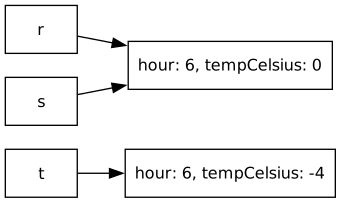
One way to think about this is in terms of boxes. A variable is a labelled box. For a primitive, the box contains the value. For an object, the box contains an arrow pointing to the object, which lives elsewhere. const s = r copies the arrow. There is still exactly one Reading, with two arrows pointing at it, and a change made through either arrow is visible through both. Two variables referring to the same object are called aliases. Aliasing is the most common source of surprises with mutation: code changes an object through one name, and the change appears under another name somewhere else.
Aliasing is also why map and filter are less protective than they look. Each builds a new array, so the original array is untouched. But that new array is filled with the references it found in the original array. When the elements are objects, both arrays lead to the same objects:
const frozen: Reading[] = day.filter((r: Reading) => r.tempCelsius < 0);
frozen[0].tempCelsius = 0;      // changed through frozen's reference

test("the change reaches back into the original day",
    checkExpect(() => day[0].tempCelsius, 0)
);
The array was copied, but the readings were not. A copy that duplicates only the top level and shares everything beneath it is called a shallow copy, and Part 2 returns to it when the question becomes how to hand data out safely.
References Are Pointers (a Preview of CPSC 213)
Concretely, the box holds a memory address. Every object lives somewhere in the computer's memory, and a reference is the number of the location where that object begins. The "arrow" in our box picture is the runtime following the address to the object.
C, the language at the centre of CPSC 213, makes all of this explicit. Its references are called pointers, a pointer's numeric value can be printed, compared, and even used in arithmetic, and the language has dedicated operators for taking an address (&x) and for following one (*p). TypeScript runs on the same machinery but hides it completely: you cannot observe an address, manufacture one, or do arithmetic on one. Everything this chapter says about sharing and aliasing is the visible behaviour of that hidden machinery.
The other thing C makes explicit is memory management. In this course we never think about where objects live or when their memory is reclaimed. In C, the programmer asks for memory when creating an object (malloc) and must announce when the program is finished with it (free), because nothing else will. Both directions of mistake are serious: freeing too early leaves dangling pointers, aliases to memory that may already be reused for something unrelated, and forgetting to free leaks memory that can never be recovered while the program runs. Many of the most damaging security vulnerabilities in widely-used software come from these mistakes.
TypeScript spares you all of it by reclaiming unreachable objects automatically (the garbage collection deep-dive later in this chapter), trading away some performance and control to do so. When you reach CPSC 213 you will manage memory yourself, and see what the runtime has been doing for you here.
References explain the const surprise from the previous section: const locks the box, not the object the arrow points to. The arrow cannot be redirected, but the object at the end of it remains as mutable as ever.
Reference Equality vs Value Equality
=== (strict equality, from Chapter 2) means different things for primitives and objects, and the difference is the visibility distinction from this section.
For primitives, === compares values. Two numbers that happen to be equal are ===, whether or not they were declared together:
let x: number = 5;
let y: number = 5;

test("separately declared numbers with equal values are ===",
    checkExpect(() => x === y, true)
);
For objects, === compares identity: it asks whether two variables refer to the same object in memory, not whether their contents match (value).
const r: Reading = { hour: 6, tempCelsius: -4 };
const s: Reading = r;                              // s refers to r's object
const t: Reading = { hour: 6, tempCelsius: -4 };   // a separate object with equal contents

test("r and s are the same object", checkExpect(() => r === s, true));

test("r and t are different objects, despite identical contents",
    checkExpect(() => r === t, false)
);
This is the visibility rule restated as a comparison. Because r and s are the same object, a mutation through one is seen through the other. t is a different object, so it is untouched:
s.tempCelsius = 0; // mutate s

test("r sees the change made through s",
    checkExpect(() => r.tempCelsius === 0, true)
);

test("t, a separate object, does not see the change",
    checkExpect(() => t.tempCelsius === -4, true)
);
So r === t being false is not a technicality. It is the runtime telling you that r and t are independent, and that changing one will never change the other.
What a Function Can Change
The copy-versus-reference distinction matters because calling a function performs an assignment: each argument is assigned to its parameter. Everything about what a function can change in its caller follows from those parameter assignments.
We will walk through three cases. These rules differ between programming languages, so when you learn a new language, find out exactly how it passes parameters.
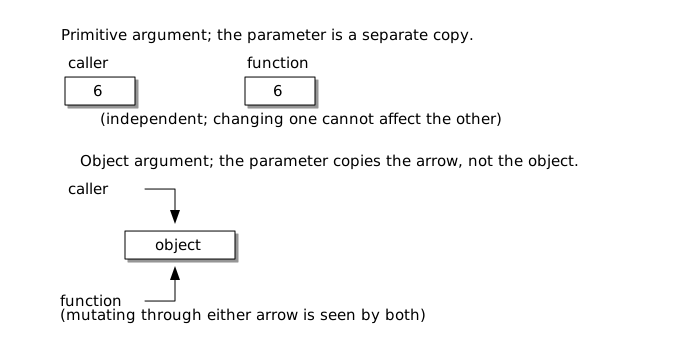
1. Passing a primitive: the function gets a copy. The parameter is a new box holding a copy of the value, so nothing the function does to it can affect the caller:
function bump(n: number): void {
    n = n + 1;          // changes only the function's own copy
}

test("bump leaves the caller's number unchanged",
    checkExpect(() => {
        let hour: number = 6;
        bump(hour);
        return hour;
    }, 6)
);
This behaviour is called pass-by-value. The function receives the value, not the variable. bump compiles and runs, but accomplishes nothing, because it reassigns only its own copy n, which is discarded when the function exits.
A Check With Several Steps
This is the first check we have written whose thunk has a body in braces. Every thunk we have seen so far has been a single expression, () => <actual>, which implicitly returns its value. Testing what a function does to its argument takes several steps: create the value, call the function, and evaluate the result. A body in braces holds all three, so each check builds its own value and no other check can change it. The Testing point in Side Effects explains why that matters.
As the arrow function tooltip in Chapter 1 described, a block body returns nothing implicitly, so the value the check compares must be returned explicitly. Written without the return:
checkExpect(() => {
    let hour: number = 6;
    bump(hour);
    hour; // read, then discarded
}, 6);
the thunk does the work but does not hand back the answer. The compiler rejects this call before the test can run: a thunk that returns nothing can only be compared with nothing, so the error points at 6, saying that a number is not assignable to void. Whenever you use braces, check whether a return is needed. When a check fits in a single expression, prefer the form without braces.
2. Passing an object: the function gets a copy of the reference. The parameter is a new box, but it holds a copy of the arrow, and the arrow points at the caller's object. Mutation through the parameter changes the one object both arrows share, and the caller sees it:
/**
 * Corrects a reading from a sensor that is known to measure
 * offset degrees away from the true temperature.
 * Modifies the given reading in place.
 */
function calibrate(reading: Reading, offset: number): void {
    reading.tempCelsius = reading.tempCelsius + offset;
}

test("calibrate changes the caller's object",
    checkExpect(() => {
        const morning: Reading = { hour: 6, tempCelsius: -4 };
        calibrate(morning, 1);
        return morning.tempCelsius;
    }, -3)
);
This behaviour is commonly called pass-by-reference: the function is operating on the caller's object, not a private copy. The change calibrate makes is externally visible after the function has exited.
The void Return Type
The functions above are our first whose signatures declare a return type of void: they return nothing, so there is no value to declare or return. A void function is called purely for what it does rather than what it produces. Before this chapter, that would have made such a function useless. bump is useless and calibrate is not, and the difference between them is the subject of this chapter.
3. Reassigning an object parameter: still invisible. One tricky aspect of pass-by-reference comes up when we reassign a function's parameters. Parameters hold a copy of the arrow. Reassigning that arrow points the function's own box somewhere new, but leaves the original arrow unchanged. Make sure you understand this example, because many languages have similar rules:
function reset(reading: Reading): void {
    reading = { hour: reading.hour, tempCelsius: 0 };
}

test("reset leaves the caller's object unchanged",
    checkExpect(() => {
        const evening: Reading = { hour: 21, tempCelsius: -2 };
        reset(evening); // reset redirected its local arrow only
        return evening.tempCelsius;
    }, -2)
);
Compare calibrate and reset carefully: one writes reading.tempCelsius = ..., the other writes reading = .... Mutating through a reference (reading.tempCelsius) changes the shared object and is visible to the caller. Reassigning the reference itself (reading) just rebinds the function's local name and is invisible externally. What matters is whether the object itself is being changed, or only the local reference to it.
What "Pass-by-Reference" Means in TypeScript
The terms used above are the ones you will hear in practice. But the way it is implemented might be surprising. TypeScript passes every argument by value. For objects, the value being copied is a reference. For primitives, the value being copied is the value itself. Some languages have true pass-by-reference (C++'s int&), where the parameter is the caller's variable under another name, and a reassignment like the one in reset would change the caller's variable. TypeScript has no such mechanism, which is why reset cannot work. When learning a new programming language, a common question is "are object arguments shared or copied, and can a callee rebind my variable?".
Summary
| Argument passed | The parameter receives | Reassigning the parameter | Mutating the object it refers to |
|---|---|---|---|
number, string, boolean | A copy of the value | Invisible to the caller | N/A (primitives cannot be mutated) |
| Object or array | A copy of the reference | Invisible to the caller | Visible to the caller |
Here is a visual representation of this distinction:
Scope: Where Names Live
Mutation makes it newly important to know exactly where each variable exists, because every variable that can change is something a reader must keep track of. Where a variable exists is called its scope.
TypeScript scopes variables using block scope: a variable exists from its declaration to the end of the block (the { ... }) that encloses it. The name is only visible inside that block. The compiler enforces this rule statically:
function describe(reading: Reading): string {
    if (reading.tempCelsius < 0) {
        const label: string = "freezing";
        return label;        // fine: label is in scope here
    }
    return label;            // compile error: Cannot find name 'label'
}
Blocks nest, and the rule works one way: an inner block can use names declared in the blocks that enclose it, but never the reverse. longestFreezingStreak relies on this. Its loop body reads and reassigns current and longest, which are declared outside the loop in the function's own block. That is what lets their values survive from one iteration to the next. To see why their position matters, consider what happens if current is declared inside the loop body instead:
for (const reading of day) {
    let current: number = 0;      // a brand-new current for every element
    if (reading.tempCelsius < 0) {
        current = current + 1;   // always computes 0 + 1
    }
}                                // ...and current is gone again
Each pass through a loop body is a fresh copy of the block: this current is created holding 0, exists for one iteration, and is discarded at the closing brace, along with its value. A variable declared inside a block cannot remember anything across runs of that block.
Where you declare a variable decides how long its state lives. The design rule of thumb is to declare each variable in the smallest block that still contains every use of it.
There are three ways a value can outlive the block that created it:
- The value is returned. The name
longestdisappears whenlongestFreezingStreakends, but its final value escapes throughreturninto the caller's hands. - The value is assigned to a variable declared outside. The loop body's assignments to
currentandlongestoutlive each iteration because those variables live in the enclosing block. - The block mutates an object that is visible outside. This one is the easiest to miss. Consider calibrating an entire day:
function calibrateDay(day: Reading[], offset: number): void {
    for (const reading of day) {
        reading.tempCelsius = reading.tempCelsius + offset;
    }
}
Every name in sight here is short-lived: reading is re-created each iteration, and the day parameter vanishes when the function returns. Yet every change survives, because the objects those names pointed at belong to the caller's array, which is still in scope outside the function.
Scope governs names, not objects. In TypeScript, an object lives as long as anything, anywhere, still refers to it. Mutations made to an object through a short-lived name are permanent. Block structure determines whether a variable name still exists, and the arrows determine whether a change persists.
Object Lifetimes and Garbage Collection
An object's lifetime is determined by reachability, not scope. An object lives as long as some chain of references, starting from a live variable, leads to it. When the last reference is gone, the object can never be observed again, and the runtime reclaims its memory automatically, a mechanism called garbage collection. This is why TypeScript programs never explicitly destroy objects. Languages without garbage collection (C, C++) make the programmer manage object lifetimes by hand, and whole categories of serious bugs come from getting it wrong.
Mutability, Immutability, and Program Complexity
A value that can never change after creation is called immutable, and much of this chapter's difficulty disappears when data is immutable. Aliasing only matters because somebody can write: two arrows pointing at an object that nobody can change behave exactly like two private copies, so the copy-versus-reference distinction stops affecting what a program computes. A reader can treat every immutable value as a fact rather than a state: learn it once and rely on it anywhere, in any order. ISL had this property everywhere. With no mutation in the language, every value was a fact, which is part of why the substitution model worked and why no chapter before this one needed a trace table.
Mutability provides efficient updates and direct modelling of change, at the cost of requiring this reasoning. Every alias to a mutable object is a potential writer, so the effort of understanding a value grows with the number of places that can reach it, and the order of operations starts to matter. The complexity is real enough that much of professional practice is organised around limiting it: declaring everything const, preferring operations like map and filter that return new values, and designing types whose instances are never modified after construction. Some languages go further. In Rust, values are immutable unless explicitly marked otherwise, and the compiler restricts shared mutable data.
The working compromise in most systems, and in this course, is immutability by default with mutation where the problem demands it. A program in which the few mutable values are clearly marked, narrowly scoped, and changed in only a few places keeps most of the simplicity of immutable data while paying mutation's costs only where they are needed.
Side Effects
We now have a name for what calibrate and calibrateDay do. A side effect is any observable change a function makes besides returning a value. This can include mutating an object its caller can see, reassigning a variable outside its own scope, or interacting with the world outside the program entirely (writing a file, printing output, sending a network request). A function with no side effects, one that only computes a value from its inputs, is called a pure function. Every function we showed before this chapter was pure.
Side effects change what we must do as readers, as documenters, and as testers of code:
- Reading. A pure function can be understood from its signature:
Reading[]in,numberout. A signature likecalibrateDay's (withvoidout) says nothing about what the function is for, because its whole purpose is the effect. You must read the implementation, or trust the documentation. - Documenting. Because the signature does not provide cues about side effects, the documentation has to say what the function changes. The line
Modifies the given reading in placeincalibrate's comment provides this hint. A mutating function whose documentation does not mention the mutation is a trap for every caller who reasonably assumes their arguments come back unchanged. - Testing. A pure function is tested by checking its return value. A mutating function is tested by checking state: call it, then assert on the object afterwards. Do both inside the check, as the tests in What a Function Can Change did. The testing framework loads the whole file before it runs any check, so a change made at the top level of the file has already happened when every check runs, including the checks written above it. A value created inside a check cannot be changed by any other check.
test("the first reading is shifted by the offset",
    checkExpect(() => {
        const readings: Reading[] = [
            { hour: 6, tempCelsius: -4 },
            { hour: 9, tempCelsius: -1 }
        ];
        calibrateDay(readings, 1);
        return readings[0].tempCelsius;
    }, -3)
);

test("the second reading is shifted by the offset",
    checkExpect(() => {
        const readings: Reading[] = [
            { hour: 6, tempCelsius: -4 },
            { hour: 9, tempCelsius: -1 }
        ];
        calibrateDay(readings, 1);
        return readings[1].tempCelsius;
    }, 0)
);
Each check builds its own readings, which repeats the setup. Chapter 9 shows two ways to avoid this: one test can make several checks against the same values, and a test runner can build fresh values before each test.
There is one more consequence that we have been building towards in Part 1. The invariants chapters established a practice: validate a value when it is constructed, and rely on the invariant afterwards. Mutation breaks the "afterwards". reading.hour = 99 is a legal statement that violates the Reading invariant long after construction, and aliasing means any part of the program holding a reference can do it, at any time. With mutation, an invariant is no longer established once. It must be preserved by every operation that touches the data.
Keeping that promise requires controlling who is allowed to mutate state at all. Chapter 4 already showed one way to do that: hold the invariant-relevant state inside a closure, where no other code can reach it, so there is no reference to alias in the first place. That technique protects data by never handing it out, but the readings in this chapter are passed from function to function because callers need them. Part 2 takes up the general version of the problem, replacing the closure pattern with language syntax that lets data be shared while still restricting who may change it.
Until then, we will continue to follow a discipline-based approach:
- Declare every variable with
const. When a value turns out to need changing, change that one declaration tolet, deliberately. Everyletis a value your reader must trace through time. - Prefer the non-mutating operations (
map,filter) when they fit, remembering that they copy the array and not the objects inside it. Use mutation when the problem is about change, as the arriving readings and the streak counters were. - Keep mutable state in the smallest scope that works: a counter local to one function is easy to reason about, while a mutable value visible to the whole program can be changed by the whole program.
- Clearly document mutation when it happens: in a function's name, its documentation, and its tests.
Mutating the World
Mutation is worth its drawbacks, because real programs model a changing world. Programs must now be understood by tracing values through time, and every reader needs to be able to answer a new set of questions: is this a copy or a reference? Does this change escape this block, this function, this module? Who else holds an arrow to this object? The box-and-arrow model and the scope rules in this chapter are the tools for answering these questions.
Side effects add new complexity we have not encountered yet: effects that reach outside of specific functions, to other parts of the program, to files, databases, networks, and users. But since the point of programs is to do useful work for people, side effects are a necessary part of real software systems. Side effects require careful thought and design to use effectively without making a program too hard to understand or brittle to evolve.
Exercise: Moving a Robot
Here we practise in-place mutation, references and aliasing on a small moving object.
As a game engine, I want a robot's position updated as it moves, so that the rest of the game can read its current location.
A robot is just a position:
type Robot = { x: number; y: number };In each part, create the robot inside the check that tests it, as the calibrate and calibrateDay tests did, so that no part can move a robot that another part is checking.
- Write
step(robot: Robot, dx: number, dy: number): voidthat moves the robot by addingdxto itsxanddyto itsy, changing the robot in place. Create a robot at{ x: 0, y: 0 }, callstep(robot, 1, 2), and write one test per coordinate, each with a singlecheckExpect, confirming the caller's robot now has anxof 1 and ayof 2. - Write
teleport(robot: Robot, x: number, y: number): voidthat instead reassigns the parameter, withrobot = { x: x, y: y }. Predict what the caller's robot looks like afterteleport(robot, 9, 9), then confirm it withcheckExpect. Why doesstepchange the caller's robot whileteleportdoes not? - Give a robot a second name with
const other = robot. Callstep(other, 3, 0), and usecheckExpectto show thatrobotsees the move, becauseotheris an alias for the same object. Then build a separate robottwinwith the same coordinates, and use===to confirm thatrobot === otheristruebutrobot === twinisfalse. - Write
walk(robot: Robot, steps: number[]): voidthat uses afor ofloop to apply each number instepsas an eastward move (onestep(robot, s, 0)per element), so the position carries forward from one iteration to the next. Check the robot's finalxagainst the sum ofsteps.