Learning a New Programming Language
This chapter introduces TypeScript, the language we use for the rest of the course. Much of CPSC 110 carries over. What is new is mostly a matter of how things are written down and how much the language checks for you.
To make the transition concrete, we scaffold from the teaching languages you learned in 110. Each new concept is related back to the idea it corresponds to in the teaching languages, and the differences are called out as they arise. The next language you learn may offer no such scaffolding, and that is fine. Having built these comparisons once, you will know which questions to ask of any new language. If you came from another language this still applies, and if that language was Python, types that are checked before the program runs may be new to you as well.
For brevity's sake, we'll use the term ISL (Intermediate Student Language with Lambdas) as shorthand for the teaching languages used in CPSC 110. Many ISL features are also present in BSL (Beginner Student Language).
Programming Languages
Every software system is written in a programming language, and every language has to provide the same handful of basic capabilities: ways to name values, to make decisions, to repeat work, and to describe the data the program operates on.
The most obvious way languages differ is syntax. Syntax is the set of rules for how a program must be written so that the computer can read it.
A Difference in Syntax: Prefix vs Infix
In ISL, to add 2 and 3, we write:
(+ 2 3)In TypeScript we write:
2 + 3While the characters are different (syntax), both have exactly the same meaning. In programming languages, we call that meaning semantics.
Syntax where the operator appears before the operands, as in (+ 2 3) or + 2 3, is called prefix syntax. When the operator appears between the operands, as in 2 + 3, it is called infix syntax.
In ISL, all syntax was prefix. In TypeScript, most basic operations (such as addition and comparison) are written in infix syntax.
A more important difference is what the language enforces for you. A language can check things about your program before it ever runs, or it can leave those checks to you.
Enforcement mechanisms are where TypeScript differs most from ISL. TypeScript makes types an explicit, checked part of the program, and it analyses and transforms your source code with a compiler before the program executes. The compiler catches many common programming mistakes and makes it easier to build large systems.
Another big difference is that TypeScript primarily expresses control flow using statements, which differ from the expressions you used in ISL.
Quick Primer on Functions
Functions are the basic unit for organising the code in a program. A function declaration looks like this:
function letterGrade() {
    // function body
}
The part of the declaration after the word function and before the first { is called its signature. When a function is called, its body is executed. The function above can be called by:
letterGrade();We will expand on function declarations later in this chapter.
Types in TypeScript
In ISL you documented type information as comments. A function's signature, like (@signature Number -> String), told the reader what the function expected (a value representing a Number) and produced (a value representing a String). However, the language did not check that those types were honoured. If you passed a string where a number was expected, the language did not object. The mistake surfaced later, when you ran the program and it did not do what you expected.
Basic Types: number, string, and boolean
TypeScript provides several basic types to describe individual values. Three of the most common are number, string, and boolean. number is the standard numeric type, used for both integer (such as 3) and floating point (such as 3.14) values. string describes textual data. String values are enclosed in either single quotes 'CPSC' or double quotes "CPSC", although it is best practice to be consistent about the kind of quote used in a program. boolean has two values, true and false.
As the course progresses we will examine a few more basic types, and will spend considerable time describing how to design and construct complex types.
Arithmetic on number Values
TypeScript provides five arithmetic operators, each written in the infix style described above:
2 + 3;    // 5,   addition
5 - 2;    // 3,   subtraction
4 * 3;    // 12,  multiplication
7 / 2;    // 3.5, division
7 % 2;    // 1,   remainder
Two of them behave differently from their ISL counterparts, and both differences follow from TypeScript having a single number type rather than separate integer and rational types.
/ is always floating-point division, so dividing two whole numbers can produce a fractional result: 7 / 2 is 3.5, not 3. Where ISL offered quotient for whole-number division, TypeScript has no operator that divides and discards the fraction.
% produces the remainder left after division, the role that remainder played in ISL: 7 % 2 is 1, and 6 % 2 is 0. Its most common use is keeping a value inside a fixed range. To step through a list of n items and wrap back to the beginning, write (i + 1) % n, which returns to 0 as soon as i + 1 reaches n.
*, /, and % are evaluated before + and -, as in ordinary arithmetic, so 2 + 3 * 4 is 14. Use parentheses wherever the grouping would otherwise be easy to misread.
Exact Numbers in ISL, Inexact Numbers in TypeScript
In ISL, dividing two integers gives an exact rational number. (/ 35 50) is exactly 7/10, and (* (/ 35 50) 100) is exactly 70. Racket keeps the fraction rather than converting it to a decimal, so arithmetic on whole numbers stays exact however you order the operations.
TypeScript has a single number type, and it stores values as a binary approximation of the decimal you wrote. Most decimals cannot be represented exactly in binary, in the same way that 1/3 cannot be written exactly as a decimal:
(11 / 20) * 100;    // 55.00000000000001, not 55
(29 / 50) * 100;    // 57.99999999999999, not 58
Two consequences follow, and both apply to any language that stores numbers this way:
- Order your arithmetic so that division comes last.
(11 * 100) / 20gives exactly55, because the multiplication happens while the values are still whole numbers. - Be careful comparing computed decimal values for exact equality. A test that expects
(11 / 20) * 100to equal55fails, even though the difference is tiny.
In TypeScript you annotate each value with its type directly in the code, and the language checks those annotations for you when you invoke the compiler. This does two things:
- First, the type communicates intent: a well-chosen type tells the next reader exactly which kinds of values are valid.
- Second, the type is enforced by a type checker within the compiler. The compiler reports a value of the wrong type as an error, so you do not have to discover the bug by running the program.
We now extend letterGrade to take a numeric score out of 100 and produce the matching letter grade. Recall that the named inputs a function declares (such as score) are its parameters, and the actual values passed in when it is called are its arguments.
The following signature says that letterGrade takes a single parameter called score that must be a number, and always returns a string:
letterGrade(score: number): stringFunction Signatures in TypeScript
The function signature:fn(x: X, y: Y, z: Z): Adefines a function with the name fn, with parameters: x of type X, y of type Y, and z of type Z. It also specifies that fn returns a value of type A. A function signature can have any number of parameters.
Parameter types come after the parameter they type, separated by a :. The return type is placed after the parameter list, following a second :.
The type checker works from the types you write down, along with the types it can infer from them. In this course we write a type for the inputs and output of every function. Each parameter gets a type, and so does the return value. These are the same places you would have written type comments in ISL.
Signatures in ISL
In ISL, we would have captured the letterGrade type information as a comment in the signature:
; Number -> String
; produce the letter grade for a percentage score
(define (letter-grade score) ... )
or a signature annotation:
(@signature Number -> String)
; produce the letter grade for a percentage score
(define (letter-grade score) ... )
But either way, ISL does not use the signature to check that letter-grade is invoked correctly.
; no error reported before running the program
(letter-grade "Hello")
Compiling and Checking
In CPSC 110, DrRacket executed your program the moment you pressed Run. TypeScript adds a step before your code runs. The program is first analysed and transformed by a compiler, a program called tsc.
At the start of compilation, tsc invokes a type checker, whose job is to check whether your program is consistent with the declared types (that is, has no type errors). If tsc finds a type error, it reports it. Treat a program with type errors as broken, and fix every error the compiler reports before you run the code. Some tools, such as the test runner, will still run a program that has type errors, but its types no longer tell you anything about how it behaves.
Anatomy of a Type Error
Here are a few lines of code that call the letterGrade function whose signature we described above, and whether the compiler would allow them or they would result in an error:
letterGrade(85);        // ok: 85 is a number
letterGrade(92.35);     // ok: 92.35 is a number
letterGrade("eighty");  // compilation error (A)
letterGrade(false);     // compilation error (B)
The compiler will tell you both where the error is and what is wrong with your code. For the two errors above, the compiler will point to the file and line number and give the following two messages:
(A) Argument of type 'string' is not assignable to parameter of type 'number'.
(B) Argument of type 'boolean' is not assignable to parameter of type 'number'.
Fix both calls before you run the program.
The compiler sits between the source you write and the program that runs, and it is where type errors are caught before anything executes:
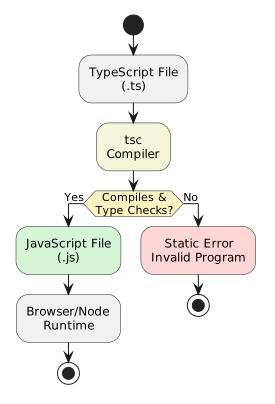
tsc type checks and transforms TypeScript before it can execute. Tools for Writing Source Code
Because the compiler is now part of how you write code, you should write TypeScript in an Integrated Development Environment (IDE) rather than a plain text editor. Visual Studio Code is a free IDE, and it is the one used on the midterms and the final exam, so it is a good one to learn. You can also use other IDEs, such as WebStorm (also free for students).
An IDE runs the language's type checker continuously in the background as you type and shows each error in place, on the line that caused it, the moment it appears. You no longer have to run tsc by hand and read through a list of errors. You see the same static checks where you are working, which gives you faster feedback as you write your code. Live type checking is the feature that matters most for now, but as the course continues we will engage with other features within the IDE as well.
Control Flow Statements
Most programming languages have two main kinds of construct: expressions and statements. ISL is built almost entirely from expressions. Every chunk of ISL code is evaluated to produce a value, and that value is passed into the expression that contains it.
TypeScript has expressions too, but it adds a second kind of construct: the statement. A statement does not evaluate to a value. It performs an action, such as making a decision or returning from a function. Often this action changes the program's state, which includes the names that are defined (such as variable or function names) and the values those names take on. A TypeScript program is written as a sequence of statements that run in order.
We have already seen one kind of statement, the function declaration. This section introduces two more.
if Statements
The if statement chooses whether to run a block of code based on a condition. Unlike ISL's cond, it does not evaluate to a value. It only directs which code runs. Statements that direct which code runs next are called control flow statements, and if is the most basic one in most languages.
A basic if statement is shown below. If the condition grade >= 50 is true, the code labelled // (A) will execute. If the condition grade >= 50 is false, the code labelled // (B) will execute.
if (grade >= 50) {
    // (A) handle passing grade
} else {
    // (B) handle failing grade
}
Right now (A) and (B) are comments rather than concrete code, and they stand for any sequence of statements. The curly braces {} designate a block, which can contain a sequence of statements. So several statements could go at // (A) or // (B). We'll give a concrete example once we introduce another type of statement.
The two sides of the if statement are called branches. When the condition (grade >= 50 above) evaluates to true and we execute // (A), the run takes the then-branch. When the condition evaluates to false and we execute // (B), the run takes the else-branch.
Often we only want to run code when a condition is true. In that case the else can be left out:
if (grade >= 50) {
    // code to run if grade is passing
}
This is identical to having an empty else block:
if (grade >= 50) {
    // code to run if grade is passing
} else {
}
if Statements and Block Statements
A block statement starts with { and ends with }. It groups together a list of statements:
{
   <statement-1>;
   <statement-2>;
   <statement-3>;
}
so that first <statement-1> will run, then <statement-2> will run, etc. It can group together any number of statements. The <> marks a place where any statement can go, and is not part of TypeScript's syntax.
In general TypeScript, if you separate your statements with ;, you can write them on the same line, and the meaning is the same: { <statement-1>; <statement-2>; <statement-3> }. However, in this course, we will always put statements on separate lines for clarity.
If statements have two forms. First, the if (no else) statement:
if (<condition>)
   <then-statement>
where <condition> is an expression that evaluates to a boolean, and <then-statement> is another statement. If <condition> is true, <then-statement> runs. Otherwise, it is skipped. The parentheses around <condition> are necessary.
While technically <then-statement> need not be a block, in this class we will always make it a block statement, as this improves clarity:
if (<condition>) {
   <block-contents>
}
The second form of if runs <then-statement> if <condition> is true, and runs <else-statement> if <condition> is false:
if (<condition>)
   <then-statement>
else
   <else-statement>
Again, in the course we will always make <then-statement> and <else-statement> block statements:
if (<condition>) {
   <then-block-contents>
} else {
   <else-block-contents>
}
There is one exception. We allow <else-statement> to be another if statement without a block around it. This lets us chain if-else statements to test several conditions in turn:
// else if version
if (<condition-1>) {
   <cond-1-then-block-contents>
} else if (<condition-2>) { // second if statement starts here
   <cond-2-then-block-contents>
} else {
   <cond-2-else-block-contents>
}
This else if syntax is clear enough that we don't add { around the second if statement. But the program would behave the same way if we did:
// nested ifs version
if (<condition-1>) {
   <cond-1-then-block-contents>
} else {
   if (<condition-2>) { // second if statement starts here
       <cond-2-then-block-contents>
   } else {
       <cond-2-else-block-contents>
   }
}
Again, this is only a difference in syntax.
A chain of if statements tests its conditions one after another until one holds. Let's use this to build up our letterGrade function:
function letterGrade(score: number): string {
    if (score >= 80) {
        // function should evaluate to "A"
    } else if (score >= 68) {
        // function should evaluate to "B"
    } else if (score >= 55) {
        // function should evaluate to "C"
    } else if (score >= 50) {
        // function should evaluate to "D"
    } else {
        // function should evaluate to "F"
    }
}
In the code above, once one condition is true and its branch runs, none of the other branches run. We've written what we intend in each branch, but how do we say what the function should evaluate to in TypeScript?
return Statements
A TypeScript function returns a value only through a return statement. The return statement hands a value back to whoever called the function and stops the function there.
return Statements
return <expression>; evaluates the expression <expression> to a value v (for example, 2 + 3 to 5), stops executing the function there, and returns this v to the caller of the function.
For instance, if the function foo contains return <expression>;, then when that statement runs, foo evaluates <expression> to v, and the call foo() is replaced with v.
The return statement only makes sense if it appears in a function definition (or method definition, which we'll see in Part 2).
The simplest example of a return statement is in the function getString below, which always returns the string "STRING":
function getString(): string {
    return "STRING";
}
To finish letterGrade, we add a return statement to each branch:
function letterGrade(score: number): string {
    if (score >= 80) {
        return "A";
    } else if (score >= 68) {
        return "B";
    } else if (score >= 55) {
        return "C";
    } else if (score >= 50) {
        return "D";
    } else {
        return "F";
    }
}
Each return exits the function immediately, so the order of the checks matters: a score of 95 is caught by the first if and never reaches the others.
if vs cond vs the Ternary (?) Operator
if works much like cond.
An equivalent ISL function to letterGrade looks like:
; Number -> String
; produce the letter grade for a percentage score
(define (letter-grade score)
  (cond
    [(>= score 80) "A"]
    [(>= score 68) "B"]
    [(>= score 55) "C"]
    [(>= score 50) "D"]
    [else "F"]))
The TypeScript version says the same thing with statements: each cond clause becomes an if whose body returns that clause's value, and else becomes the final return. The behaviour is identical. What changed is that you spell out the control flow step-by-step rather than as a single expression.
The core difference between if and cond is that cond is an expression: cond evaluates to one value. The bodies of the functions you defined in ISL contained a single expression e (above, e is the cond expression) and (letter-grade 87) evaluates e with 87 in the place of score.
In TypeScript, a function body is not a single expression: it is a list of statements which will be run in order. TypeScript functions will not return a value unless they are told to by a return statement. Later, we'll see that we might want to write functions that have no return statements at all.
There does exist an expression in TypeScript that behaves like a 1-condition cond. It is called the ternary operator, and takes 3 operands (thus the "ternary"):
<condition> ? <then-expression> : <else-expression>Unlike an if statement, the <then-expression> and <else-expression> in the ternary operator must be single expressions. The single-expression limitation, and confusions that sometimes arise from the ternary operator's compact notation, are two reasons why it can often be preferable to just use if statements explicitly instead of ?.
Exercise: {} for clarity
In this class, we will use block statements as the statement after any if conditions. In the wild, you may see if statements that aren't followed by {. You should be able to read those as well.
Consider the following piece of code:
function toPassFail(s: number): string {
    if (s > 0)
        if (s > 50)
          return "PASS";
        if (s <= 50)
          return "FAIL";
    else
          return "NEGATIVE";

}- Suggest three inputs you would pass to
toPassFailto check its behaviour. - Without executing the code, predict, for each input, what
toPassFailwould return. - Execute
toPassFail(i)for each inputiyou've decided on. Does its return value match your prediction? Why or why not?
Static and Dynamic Views
There are two natural perspectives through which you can view any program. The static view is what you see when you look at your source code. It is fixed text sitting in a file, and it can be read and analysed without being executed. Types you write down in a function signature are static, as is the overall structure of your code. The compiler works entirely in this static world, and it can check your types before the program runs.
But we do not just write programs for them to sit as text on a filesystem. We write programs to do things, which gives rise to the dynamic view of the program. When the code executes, it is run on some actual inputs, which cause variables in the code to take on different values, and control flow statements to follow different branches. Which branch an if takes, what a variable holds at a given moment, and how many times a piece of code runs are dynamic facts, decided as the program runs and often different from one run to the next.
The two views also explain when errors appear. In ISL and other dynamically-typed languages (such as Python), a type mistake surfaces while the program runs, and only if you happened to execute code that hits that type mistake. These are runtime errors, because they happen at the time the program runs. You will also see them called dynamic errors.
In TypeScript, the tsc compiler checks the types of your entire program first, before any of it runs. This is what it means for types to catch bugs "before runtime". We call these errors, and any other errors reported before running the program, static errors.
Keeping these two views apart is useful because different kinds of problems appear in each. The compiler can rule out a whole class of mistakes statically, just by reading the text, but it cannot know what will happen once the program runs on a given input. So static checking, however good, never removes the need to run and test a program. We return to this theme throughout the course.
Testing the Dynamic View
While the TypeScript compiler checks the static view of the program, we need to check the dynamic view ourselves. We do this through a process called testing.
In Part 1 we test with checkExpect, a function that runs an expression and checks whether its value matches the value we expect. A check is always given a name and handed to test, which registers it with the testing framework. For example, to ensure that letterGrade(88) evaluates to "A", we can write the following test:
test("Score of 88 returns an A", checkExpect(() => letterGrade(88), "A"));This cannot be checked statically, so we must run the test to check the program's behaviour. If the call produces the expected value, the check passes. If they differ, the check fails with an error that describes the expected behaviour that was violated.
TypeScript has no built-in checkExpect. We built it for this course to match CPSC 110 and to need less syntax than most testing libraries.
Anatomy of a checkExpect
A checkExpect takes two arguments:
checkExpect(() => <actual>, <expected>);<actual> is an expression whose value you want to check. This is usually a call to the function under test, such as letterGrade(88). It is wrapped in () =>, an anonymous arrow function (a syntax we explain below), so that the expression is not evaluated where you write it: checkExpect decides when to run it. A parameterless function that wraps up a computation this way is called a thunk, programming jargon from the 1960s glossed as the past tense of think: an expression already thought about, set aside to be evaluated when it is needed. <expected> is the value you are claiming that expression should produce, such as "A".
Note that there are no braces around <actual>, and no return in front of it. This is deliberate. An arrow function written as () => <expression>, with no { }, implicitly returns the value of that single expression, so () => letterGrade(88) is a function that returns "A" when it is called. Adding braces would change the meaning: () => { letterGrade(88) } calls letterGrade and then returns nothing. The compiler rejects that check before it can run, because a thunk that returns nothing cannot be compared with "A". Write the thunk as a single expression with no braces, and the value flows to checkExpect on its own.
When the check runs, it calls the thunk and compares the value it returns against <expected>. If they are equal, the check passes. If they differ, the check fails and reports a message describing the expected behaviour that was violated, so you can see which expectation failed and what was produced instead.
A checkExpect only does anything when it is executed, which makes it a dynamic check: it reports nothing about the program until the program runs, unlike the type checker, which works on the static text. A check also never runs on its own. It must be placed inside a named test case, which the testing framework runs for us.
Anatomy of a Test Case
A test case gives a check a name and registers it with the testing framework by passing it to test. Both test and checkExpect are provided by the course toolkit, imported once at the top of a test file:
import { test, checkExpect } from "@ubccpsc/210-toolkit/testing";

test(<description>, checkExpect(() => <actual>, <expected>));
test takes two arguments. <description> is a string that names the case, such as "Score of 88 returns an A". It is printed in the test output, so it should state what the case checks. The second argument is the check that forms the body of the test. Each test case holds exactly one checkExpect, so a test that fails always names the single expectation that was violated.
When the test suite is executed, each test file is first run from top to bottom, which registers its test cases, and then the registered cases run in order. If the check passes, the case passes. If it fails, the case fails, and the framework reports the case's description along with the message from the check that failed.
Suppose we had a more fine-grained expectation of how letter grades should be computed and wrote the following test:
test("Score of 95 returns an A+", checkExpect(() => letterGrade(95), "A+"));In this case the test would fail, because letterGrade(95) evaluates to "A" in our current implementation. The type system cannot detect this failure statically, so we rely on tests, which run the code, to detect it.
Arrow Functions
Arrow functions have two forms. The first has a single expression in its body:(x: X, y: Y, z: Z) => <return-exp>This defines an anonymous function with 3 parameters (x, y, z of types X, Y, Z), which, when called, evaluates the expression <return-exp> with the given argument values, and returns the resulting value. There is no return keyword here, and there are no braces: a single-expression arrow function implicitly returns the value of its expression. This is the form the thunks we pass to checkExpect always take.
The second form has a block as its body:
(x: X, y: Y, z: Z) => {
    <statement-1>;
    <statement-2>;
    <statement-3>;
}
which can contain any number of statements. The braces mark the difference: once a body is a block, nothing is returned implicitly, so to return a value the return statement must be used.
Lambdas
You have seen anonymous functions before: in CPSC 110 they were called lambda expressions. When you wrote a lambda to pass to an abstract function like filter, you were creating a function without naming it, right at the place it was needed:
(filter (lambda (n) (> n 5)) (list 3 6 9))TypeScript's arrow syntax does the same job: (n) => n > 5 means the same thing as (lambda (n) (> n 5)). The () => in the check above is a lambda that takes no parameters, like (lambda () ...). The expression under test is wrapped in an anonymous function so that it can be handed to checkExpect and executed later, just as filter decided when to call your lambda.
A function like checkExpect or filter, which takes another function as an argument, is called a higher-order function. You used several in CPSC 110, including map, filter, and foldr.
Learning New Languages
Learning TypeScript is not starting over. The way you design data, break a problem into functions, and reason about behaviour is the same as in CPSC 110.
What is new is mostly enforcement and form. In terms of enforcement, we write types into the program and tsc checks them, rather than leaving them in an unchecked comment. In terms of form, we write conditional control flow with statements like if and return, rather than as a single cond expression.
Mapping a new language's constructs back to ideas you already know makes the language quicker to pick up. The first transition can be tricky, and each later one gets easier.
Exercise: Battery Status
Note: End-of-chapter exercises will contain hints hidden like so: hello I'm a hint!. In general, these hints hide design decisions that, by the end of the course, we expect you to be able to make on your own. However, if you are going through the exercise for the first time and want coding practice, you can reveal the hints.
Put this chapter's pieces together on a new problem: a typed function, an if/return chain, and a test.
As a phone user, I want the battery percentage shown as a status word, so that I can tell at a glance how urgently I need to charge.
Write a function called batteryStatus that turns a battery percentage number into a status string. The function should return "critical" for numbers below 10, "low" from 10 up to (but not including) 30, "ok" from 30 up to 80, and "full" for 80 or above.
- Write the function signature, naming the parameter
percentwith the typenumber, and usingstringas the return type. - Implement the body with a chain of
if/else if/elsestatements, each branchreturning the right status. The order of the statements will matter here! - Write one
testper status, each holding a singlecheckExpect, choosing one representative percentage per case. Predict each result before running the tests, then run them. - What does the compiler report if you call
batteryStatus("low")? Decide before you try it, then confirm.